
The error is specific enough that you trust it.
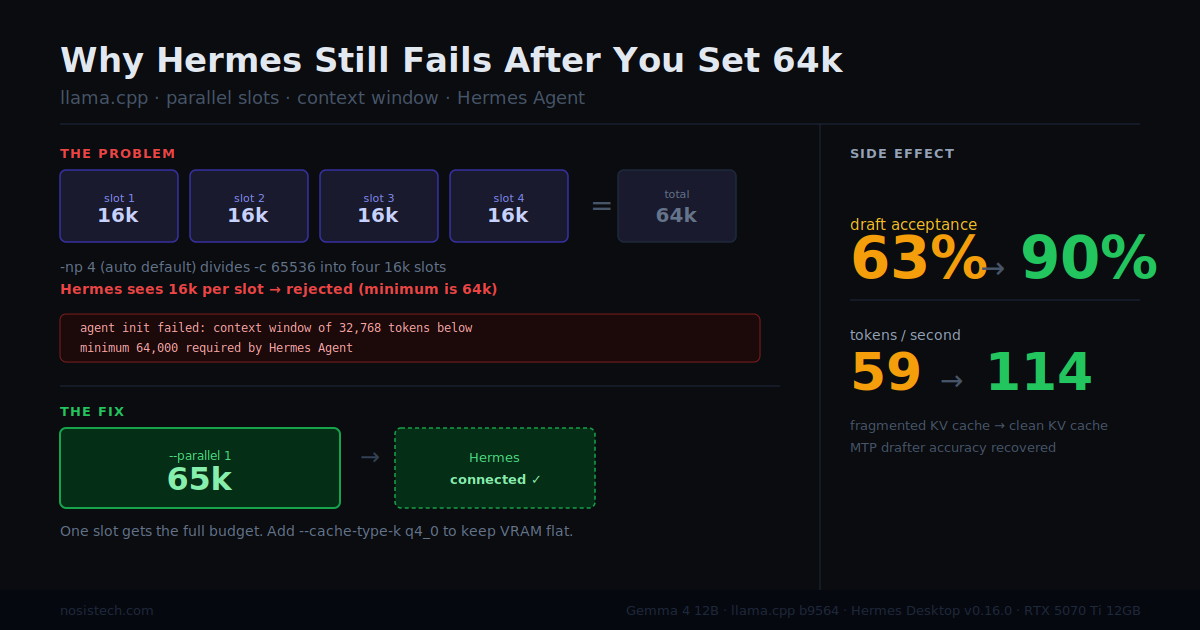
agent init failed: model has a context window of 32,768 tokens, which is below the minimum 64,000 required by Hermes Agent
You change the number. -c 32768 becomes -c 65536. You restart the server. You reconnect Hermes.
Same error.
This post explains what is actually happening and how to fix it. I also found something while fixing it that had nothing to do with Hermes.
Why Hermes needs a 64k minimum
When you chat with a regular AI, the conversation is small. Your question, its answer, some history. A 32k context window feels enormous for that, it holds roughly 50 pages of text.
An agent running a multi-step task uses context completely differently. Picture a desk. When Hermes plans a task, everything has to stay on that desk at the same time: the original instruction, the plan it generated, every file it opened, every search result it retrieved, the draft it is assembling, the log of what it already tried. A task that reads three files and runs two web searches can fill 30,000 to 40,000 tokens just in working material before it has written a single word of the answer. At 32k, Hermes runs out of desk space mid-task.
Hermes requires at least 64,000 tokens of context because models with smaller windows cannot maintain enough working memory for multi-step tool-calling workflows. That is not a preference. 64k is genuinely the minimum for a task with multiple steps.
Why setting -c 65536 still fails
llama-server has a feature most people never think about: parallel slots. A slot is an independent conversation workspace. The server can run several of them simultaneously so multiple people can use it at the same time.
The context window you configure is shared across all slots equally.
Think of it like a building with 100 rooms divided into 4 apartments. Each apartment gets 25 rooms. You need 64 rooms. The building has them. But no single apartment does, so you get turned away.
The official llama.cpp documentation defines -np, --parallel N as the number of server slots, with the default set to -1 for auto. On most machines, auto resolves to 4. Four slots. So when you set -c 65536, each slot receives 65,536 divided by 4 which equals 16,384 tokens. Hermes checks its slot, sees 16,384 tokens, and rejects the connection. The error message says the context is too small. It is technically accurate. It says nothing about the slot division.
This behavior has been reported in the llama.cpp issue tracker, users noting that context size is divided by the number of parallel slots, making it impossible to increase per-slot context without proportionally increasing the total. It is not a bug. It is by design for shared servers. It is a real problem for anyone running a personal local setup.
You can verify this yourself. Look at your server startup log for this line:
n_parallel is set to auto, using n_parallel = 4If you see a number greater than 1 there, divide your configured context by it. If the result is below 64,000, that is your problem.
The Hermes providers documentation does document this in the llama.cpp section: with -c 64000 and -np 4, each slot only gets 16k, which falls below Hermes’ minimum per active session. That note is on a different page from the error you are reading, two levels deep in a subsection most people would not reach by following the quickstart.
The fix
--parallel 1One slot. The entire 65,536-token context goes to that workspace. Hermes connects.
If you are running a local setup for yourself, you never needed four simultaneous conversation workspaces. The Hermes guide for local models explicitly shows -np 1 in the recommended single-user configuration. That note lives in a Mac-specific guide. It applies to everyone.
The VRAM problem that comes with 64k context
Doubling context from 32k to 65k means the KV cache grows proportionally. The KV cache is the model’s scratch paper, every token it processes gets written down so it does not re-read the whole conversation from scratch on every new word. More context means more scratch paper. More scratch paper means more GPU memory.
On a 12GB card already holding 7.5GB of model weights, that is a real constraint.
The solution is switching the KV cache from q8_0 to q4_0 precision. q8_0 writes in full detail, one byte per value. q4_0 writes in shorthand, half a byte. The meaning is preserved. The space requirement is cut in half.
The math: 64,000 tokens at 0.5 bytes equals exactly what 32,000 tokens at 1 byte costs. I doubled the context window and the memory footprint stayed the same.
The Hermes Mac guide calls these flags the most important optimization for memory-constrained systems, noting they allow 128k context on hardware that could not otherwise fit it.
My VRAM after making these changes: 8,252 MB. Before: approximately 10,800 MB. More context, less memory used.
One more flag: --jinja
Without --jinja, the model writes tool calls as plain text. You see a blob of JSON appear in the chat describing what the model wants to do. Hermes cannot act on it. Nothing executes.
--jinja is required for tool calling, without it, llama-server ignores the tools parameter entirely and the model outputs tool calls as text rather than executable instructions.
One flag. Add it.
The speed discovery
I was fixing a connection error. I was not trying to improve speed. After making these three changes and running a benchmark, the model was generating at 114 tokens per second. It had been running at 59.
The reason is what happened to draft acceptance rate.
My setup uses MTP speculative decoding, a tiny 465MB companion model guesses the next 4 tokens before the main 12B model runs. If the guesses are right, you get 4 tokens for roughly the cost of 1. The percentage of guesses the main model keeps is the acceptance rate.
Before the parallel slots fix, acceptance was 63%. After: 90%.
With four parallel slots, the KV cache was fragmented across four separate workspaces. The drafter reads that cache to make its predictions, and reading a fragmented cache made it less accurate. With one clean slot, the drafter reads a continuous uninterrupted context and predicts far more accurately. Nine out of ten guesses are right.
The parallel slots default was causing the Hermes failure. It was also, silently, reducing MTP performance for any single-user setup running speculative decoding.
Before: 63% acceptance → 59 tok/s
After:  90% acceptance → 114 tok/s
Final flags
llama-server
  -m [main model path]
  --mmproj [vision projector path]
  --model-draft [MTP drafter path]
  --spec-type draft-mtp
  --spec-draft-n-max 4
  --spec-draft-p-min 0.7
  -ngl 99
  -ngld 99
  -fa on
  --cache-type-k q4_0
  --cache-type-v q4_0
  --parallel 1
  -c 65536
  --temp 1.0
  --top-p 0.95
  --top-k 64
  --host 127.0.0.1
  --port 8090
  --jinja
Tested on llama.cpp b9564, Hermes Desktop v0.16.0, Windows 11, RTX 5070 Ti 12GB, Gemma 4 12B QAT.
Sources
Hermes Quickstart — 64k context minimum https://hermes-agent.nousresearch.com/docs/getting-started/quickstart
Hermes AI Providers — parallel slots behavior and –jinja requirement https://hermes-agent.nousresearch.com/docs/integrations/providers
Hermes Local LLM on Mac — single-slot configuration and q4_0 KV cache https://hermes-agent.nousresearch.com/docs/guides/local-llm-on-mac
llama.cpp server documentation — –parallel flag definition https://github.com/ggml-org/llama.cpp/blob/master/tools/server/README.md
llama.cpp issue #11681 — context divided by parallel slots https://github.com/ggml-org/llama.cpp/issues/11681
© 2026 NosisTech LLC. Licensed under CC BY 4.0. Use freely, just credit us.