
I did not plan to spend a full day optimizing a local AI stack. I planned to install a model, run it, and move on. That is not what happened.
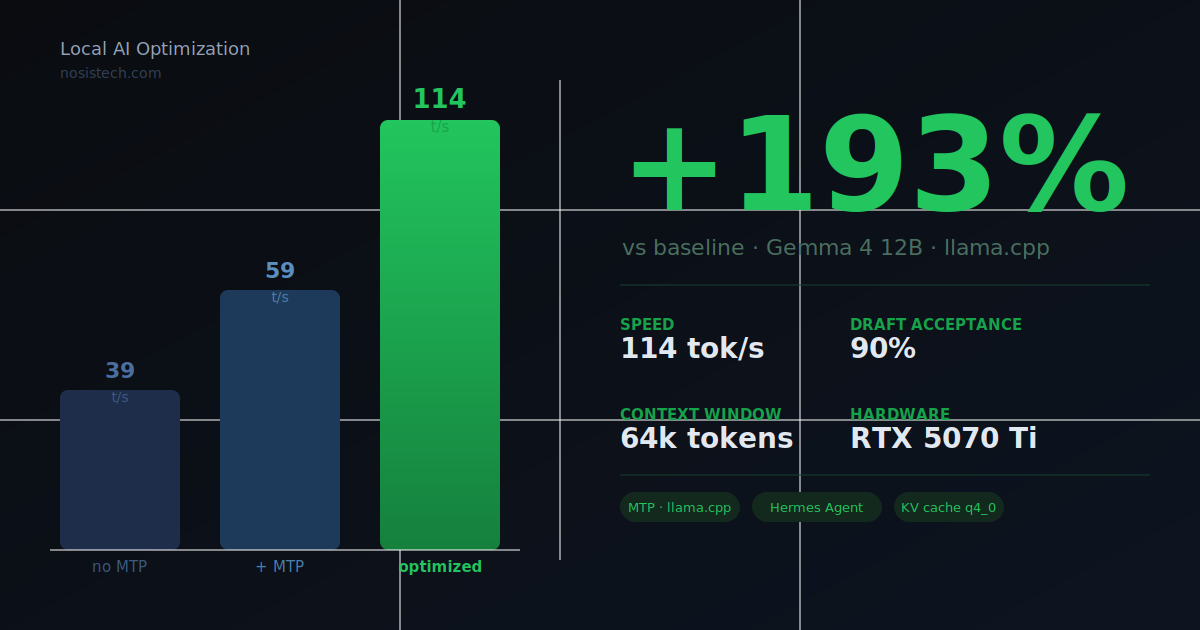
What happened instead was a chain of problems that kept leading somewhere better. By the end, my laptop was running Gemma 4 12B at 114 tokens per second with a 64k context window, connected to an autonomous agent framework called Hermes Desktop, and using less VRAM than when I started. This post is the full story of how I got there, including the parts where I was wrong and the discovery that accidentally produced the biggest performance jump.
If you are just getting into local AI, I will explain every technical term before I use it. If you already run local models, jump straight to the parallel slots section. That is where the finding is.
Why I run AI locally
I get this question often enough that I should just write it out.
I build products, prototypes, compliance and ai governance consulting. Client documents, contracts, sensitive research, none of that material goes to a third-party server. A cloud API is always someone else’s infrastructure receiving your data, regardless of what the terms of service say about retention. That is not a risk I take with client work.
Beyond privacy, the cost math changes once you use AI heavily. API bills compound faster than most people expect. A local model costs electricity. Once the hardware is paid for, inference is free.
And there is something that does not get mentioned enough: reliability. My setup runs while I am on a plane without internet, in a meeting, at 3am in my home when I should be sleeping but need to think through a problem. No rate limits, no service outages, no authentication errors at the worst possible moment. It is just there.
The tradeoff is real though. Local models are slower and smaller than the frontier cloud models. The question is not whether local AI matches GPT-5. The question is whether it is good enough for daily work, and how fast you can make it. That is what this post answers.
The starting point: Gemma 4 12B on Ollama
Google released Gemma 4 in early June 2026 as a family of open-weight models under Apache 2.0. The 12B version caught my attention immediately: it scores 77.2% on MMLU Pro, beating the previous Gemma 3 27B despite being less than half its size. Runs on a 12GB GPU. Handles text, images, and audio natively.
I pulled the QAT version. QAT stands for Quantization-Aware Training. Google trained this model knowing it would be compressed to run on consumer hardware, so the compression is much cleaner than the standard approach. Near-full quality at a fraction of the file size.
My hardware is a laptop with an RTX 5070 Ti GPU, 12GB of VRAM, and 32GB of system RAM.
The initial setup was Ollama, which is the simplest way to run local models. Install, pull the model, done. I set a 24k context window and the parameters Google recommends for Gemma 4.
First speed measurement: 39 tokens per second.
A token is roughly three-quarters of a word, so 39 per second means about 29 words per second. A fast human reader processes 4-5 words per second. The model was writing fast enough to read as it streamed. Usable, but I knew it could be faster.
What MTP is and why it matters
Before the first real upgrade, I need to explain Multi-Token Prediction, because it is the core technique behind everything that follows.
The standard way a language model works: it generates one token at a time. Each token requires one full pass through all 12 billion parameters. One pass, one word-piece, then again, then again. That is what creates the streaming effect you see when a model types out a response.
MTP solves this with a sidekick. Alongside the main 12B model, you run a tiny separate model ; 465 megabytes in my case, compared to 6.7 gigabytes for the main model. This tiny model’s only job is to guess what the next 4 tokens will be before the main model runs.
Think of a chess partner who is weaker than you but faster. Before you make your move, they say: I think you will play knight to f3, then castle, then push the d-pawn. You look at their suggestion. If they got it right, you accept the whole sequence and save the time of working it out yourself. If they got it wrong, you correct it and move on.
When the guesses are accepted, you get 4 tokens for roughly the cost of 1. When they are rejected, you lose almost nothing.
The percentage of guesses the main model keeps is called the draft acceptance rate. At my initial setup it was 63%. Six out of ten guesses right, four wrong. That alone nearly doubled speed: from 39 tokens per second to 59 with MTP running.
Moving from Ollama to llama.cpp
Ollama is convenient but its MTP implementation was still maturing, particularly on NVIDIA hardware on Windows. To get full reliable MTP, I moved to running the model directly through llama.cpp, the underlying engine that Ollama itself uses internally.
One thing worth explaining before continuing, because it confused me and I have seen it confuse others: llama.cpp is released in multiple versions for different hardware. The Windows CUDA build is the one that makes the GPU work. CUDA, Compute Unified Device Architecture, is NVIDIA’s technology that lets software use a graphics card for math calculations instead of just rendering images. Without it, the model runs on the CPU at roughly 2-3 tokens per second instead of over a hundred.
The specific build I needed was compiled for CUDA 13.3 with Blackwell support. Blackwell is the code name for NVIDIA’s latest GPU architecture, used in the RTX 5070 Ti series. Think of it like a car engine generation. A Blackwell GPU has specific capabilities and instruction sets that older code does not know how to use. Running a build compiled for older architectures works, but you leave performance on the table. The right build sees the GPU for what it actually is. In the system logs you can confirm it is working when you see: CUDA : ARCHS = ... 1200,1210 | BLACKWELL_NATIVE_FP4 = 1. That 1 at the end means the engine is using Blackwell’s native 4-bit floating point math, which is part of why the speed numbers in this post are possible on a laptop.
If you have an older NVIDIA card (RTX 3000 or 4000 series), download the same build. CUDA support is what matters; the Blackwell-specific optimizations just will not activate. AMD card: look for the Vulkan build instead.
llama.cpp is not a polished app. It is a command-line server. You give it flags, it loads the model, and it serves an OpenAI-compatible API on a local port. Any tool that speaks that format: Open WebUI, Hermes, anything, can connect to it.
Getting MTP running required downloading the Windows CUDA build of llama.cpp, downloading the model files from Hugging Face directly, downloading the MTP drafter, and writing a startup script with the right flags. After that: 59 tokens per second, 63% draft acceptance.
Good. But not done.
The antivirus problem nobody writes about
Here is the part that most AI optimization posts skip: your security software will fight you.
I had scripts set up to start the AI engine automatically when I log in. My antivirus, doing exactly what it should, saw a freshly downloaded CUDA executable making network connections and occasionally deleted my startup shortcuts or killed the engine after it loaded. The behavior was intermittent, which made it genuinely hard to diagnose. The engine would start, load the model, respond to a few messages, then vanish from memory.
Once I understood what was happening the fix was clear: add the engine folder and startup scripts to the antivirus exclusion list. If you run any local AI stack on Windows, do this early. The software is not wrong to be suspicious. A program that loads multi-gigabyte files and starts serving requests on localhost looks unusual from a threat detection standpoint.
After adding exclusions and switching from downloading the model at startup to loading it from local cached files, the engine became stable.
Adding Hermes Agent: the 64k problem
Nous Research shipped the official Hermes Agent desktop app in June 2026. Hermes is an autonomous agent framework. The difference between a model and an agent: a model answers questions. An agent plans, calls tools, reads files, browses the web, executes code, and loops through that process until the task is done.
I pointed Hermes at my local engine and got this immediately:
agent init failed: model has a context window of 32,768 tokens, which is below the minimum 64,000 required by Hermes Agent
Hermes requires 64k context because it is not just chatting. During a multi-step task, the context window holds the original instruction, the plan, every tool call, every result those tools returned, and the reasoning connecting them. With 32k you run out of working space before completing anything meaningful.
I assumed changing the context window number in the config would fix it. It was not that simple.
The parallel slots problem and the accidental speed discovery
llama.cpp can serve multiple simultaneous conversations. The number it supports is called parallel slots. My engine had automatically configured itself to 4 parallel slot, meaning it could theoretically handle 4 conversations at the same time.
The problem: the context window is divided equally among those slots.
If I set 65,536 tokens of context with 4 parallel slots, each slot only gets 16,384 tokens. Hermes checks the slot size, sees 16k, and rejects it. The error message made it look like a total context size problem. The actual problem was per-slot allocation.
The fix was setting parallel slots to 1. I am the only person using this machine. I have never needed 4 simultaneous conversations. Giving one slot the full 65,536 token budget satisfied Hermes and gave me a real 64k workspace.
But doubling the context window from 32k to 64k normally requires significantly more VRAM, and I was already using most of my 12GB.
The KV cache
When the model reads a conversation, it stores what it has already processed in something called a KV cache, Key-Value cache. Every token you have sent is held there so the model does not re-read everything from scratch for each new word. More context means more tokens stored means more VRAM consumed.
The KV cache at 32k was already eating into my available memory. At 64k it would likely overflow.
The solution was changing the KV cache precision from q8_0 to q4_0. q8_0 stores each value using 1 byte. q4_0 uses 0.5 bytes. The math is clean: 64k tokens times 0.5 bytes equals the same memory requirement as 32k tokens times 1 byte. I doubled the context window at zero additional VRAM cost.
I also enabled the --jinja flag, which lets the model format tool calls in a way Hermes can actually execute. Without it, the model writes tool requests as plain text that Hermes ignores.
The benchmark: 39 to 114 tokens per second
After making the three changes, parallel slots to 1, context to 64k, KV cache to q4_0, I ran the benchmark.
114 tokens per second.
I was not expecting that. I was expecting roughly the same speed as before, maybe a small improvement. What actually happened was the draft acceptance rate jumped from 63% to 90%.
With 4 parallel slots, the KV cache was fragmented across 4 separate conversation workspaces. The tiny MTP drafter was trying to predict future tokens by reading that fragmented memory, and it was getting it wrong more often. With one clean slot, the drafter reads a continuous uninterrupted context and predicts far more accurately. 9 out of 10 guesses are now correct. Almost no computation is wasted.
The three changes together:
- 93% faster than the previous MTP setup at 59 tok/s
- 193% faster than the original 39 tok/s baseline
- 64k context instead of 32k
- 2,500MB less VRAM used despite doubling the context
- Hermes Agent running on top of all of it
What I have now
Gemma 4 12B handles daily conversations, document analysis, image reading, code review, and anything requiring genuine reasoning. It runs at 114 tokens per second with a 64k context window, enough to hold roughly 100 pages of text in working memory at once.
LFM2.5-8B from Liquid AI sits alongside it as a second option for tasks that need speed and do not involve images. It loads on demand and unloads automatically after five minutes of inactivity.
Open WebUI is the main interface, accessible from my laptop and from any device through a tunnel behind a login wall.
Hermes Agent Desktop adds the agentic layer: file browsing, web search, code execution, memory across sessions. It connects to the same local engine.
Total monthly cost: electricity. Roughly the cost of a couple cups of coffee.
Why these specific model files
Not all quantizations of the same model perform equally. For the main model I use Unsloth’s UD-Q4_K_XL build rather than the standard Q4_0 that most tools default to. UD stands for Unsloth Dynamic. A standard Q4_0 quantization applies the same 4-bit compression uniformly across every layer of the model. Unsloth’s dynamic approach analyzes which layers are most sensitive to precision loss and compresses those more carefully, while hitting the less critical layers harder. The result is a file the same size as a standard Q4 but meaningfully more accurate on reasoning tasks. Google trained these QAT weights specifically for 4-bit deployment, and Unsloth’s method preserves more of that training signal than naive quantization does.
Main model: unsloth/gemma-4-12B-it-qat-GGUF, UD-Q4_K_XL quantization.
For the MTP drafter, the model must match the architecture of the base model exactly, the drafter learns to predict tokens by internalizing the specific structure of the model it was trained alongside. A mismatched drafter produces low acceptance rates and no speed benefit. The Janvitos/gemma-4-12B-it-qat-assistant-MTP-Q8_0-GGUF drafter was built specifically for the Gemma 4 12B QAT architecture.
What I learned from this
The parallel slots finding was the one I did not see coming. Setting --parallel 4 makes sense for a shared server handling multiple users. For a single person running a local setup, it quietly fragments the KV cache and kills draft acceptance. The right setting is --parallel 1. It is not in any beginner guide I have found, and it turned out to be the single biggest free performance gain in this entire experiment.
The KV cache precision change was the other surprise. I expected some quality tradeoff switching from q8_0 to q4_0. There was none I could detect. The cache stores intermediate calculations, not the model weights themselves. The precision requirements are genuinely lower there, and halving the memory cost made it possible to double the context at zero VRAM expense.
The Hermes 64k requirement is real, by the way. An autonomous agent running a multi-step task, planning, calling tools, reading results, looping, consumes context fast. 32k fills up before the task is done. If you are building anything agentic, treat 64k as the practical floor, not a recommendation.
If your local stack is slower than you expect, check the draft acceptance rate in the server logs. If it is below 80%, look at your parallel slot count first. That one number may explain everything.
Final configuration
For anyone replicating this:
llama-server
  -m [path to main model gguf]
  --mmproj [path to vision projector gguf]
  --model-draft [path to MTP drafter gguf]
  --spec-type draft-mtp
  --spec-draft-n-max 4
  --spec-draft-p-min 0.7
  -ngl 99
  -ngld 99
  -fa on
  --cache-type-k q4_0
  --cache-type-v q4_0
  --parallel 1
  -c 65536
  --temp 1.0
  --top-p 0.95
  --top-k 64
  --host 127.0.0.1
  --port 8090
  --jinja
© 2026 NosisTech LLC. Licensed under CC BY 4.0. Use freely: just credit us.