
I Did Not Expect This to Work This Well
When I started this project, the goal was just to see if it was even worth trying. Could a mid-range gaming laptop from 2021, one you can pick up used for under $1,000 today, actually run a useful AI locally without melting, without lagging, and without requiring a PhD to set up?
The answer turned out to be yes. And by a wider margin than we expected.
Why Local AI? The Short Version
Before I talk about the machine or the model, it helps to understand why someone would want this in the first place.
Most AI tools you use today work by sending your words to a server somewhere, processing them, and sending an answer back. That is fine for most things. But think about the moments where that becomes a problem:
You are drafting a sensitive contract. You are analyzing internal sales data that your client trusts you not to share. You are working on a server that has no internet connection. You are paying per-message and the bill is adding up. Your internet is slow or unreliable and you need answers now.
In every one of those situations, a local AI changes the game completely. The model runs on your own machine. Your data never leaves your computer. There is no subscription, no rate limit, no outage on someone else’s servers. It is just you and the model.
That is the dream, anyway. The question is whether the hardware you actually own can make that dream real, or whether you need a $10,000 workstation to get there.
There is a sovereignty dimension here that does not get discussed enough. When you use a cloud AI, you are renting access to someone else’s model on someone else’s terms. That model can be updated, restricted, or shut down without notice. The provider can raise prices, change their acceptable use policy, or comply with a government data request in ways you never agreed to and may never find out about. Running a model locally means the model is yours in the same way your laptop is yours. No one can take it away, no one can see your prompts, and no one can change the rules after you have already built your workflow around them. Data sovereignty used to be a concern only for governments and large enterprises. Local AI makes it available to anyone with a mid-range GPU.
The open source dimension matters even more when you think globally. Most of the world does not have reliable broadband, a credit card that works with US payment processors, or the dollars to spend on cloud API subscriptions at American prices. An open weights model that runs on a $798 gaming laptop puts the same intelligence available to a startup in San Francisco within reach of a researcher in Lagos, a medical student in Nairobi, a developer in Bogotá. Offline. For free. Permanently. When frontier AI is gated behind subscriptions and geographic restrictions, knowledge compounds for the already-connected and stays out of reach for everyone else. Open source local models break that dynamic. They are arguably the most significant access event for intelligence since Wikipedia opened up encyclopedic knowledge, and the implications for scientific research, education, healthcare triage, and practical problem-solving in low-resource environments are only beginning to be understood.
The Machine: ASUS TUF Dash F15
Here is the hardware I ran everything on.
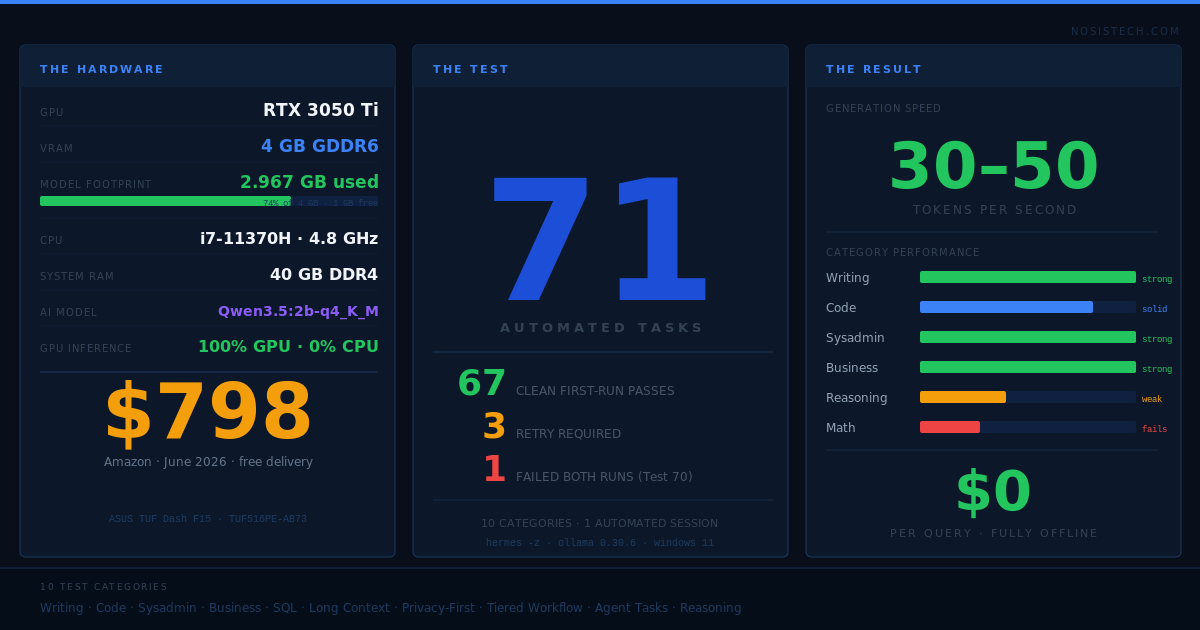
CPU: Intel Core i7-11370H — 4 cores, 8 threads, up to 4.8 GHz GPU: NVIDIA RTX 3050 Ti — 4GB GDDR6 VRAM
The GPU is the most important piece here, and I will come back to why in a moment.
This laptop launched in 2021. It was positioned as a slim gaming machine, not a workstation. As of today, the base configuration (8GB RAM, 512GB SSD, same RTX 3050 Ti) is listed on Amazon for $798.00 with free delivery. The version I used has an upgraded RAM configuration, but the GPU is identical. That 4GB of GDDR6 is the exact same card.
That number matters. I want you to hold onto it: $798 for a laptop that, as you will see, ran an AI assistant through 71 tasks across 10 different categories without breaking a sweat on most of them.
Why This Model
Choosing the right AI model for consumer hardware is more like choosing the right size engine for your car than picking between luxury brands. A bigger engine makes you faster, but shove a V12 into a compact car and it will not fit.
The model I landed on is called Qwen3.5:2b. The “2b” stands for 2 billion parameters. For context, models like GPT-4 are estimated to have hundreds of billions of parameters. So this is a small model by current standards.
But small does not mean useless, and here is why the math works in our favor.
I ran the model at a compression level called q4_K_M. Think of this like converting a massive uncompressed audio file to a high-quality MP3. You lose a tiny bit of fidelity, but the file goes from 2GB down to something manageable, and on a good speaker system you cannot tell the difference for everyday listening.
At q4_K_M compression, Qwen3.5:2b uses exactly 2.967GB of VRAM. Our GPU has 4GB. It fits with room to spare. The entire model loads onto the graphics card and stays there, which means every single token it generates is processed at full GPU speed.
The 64,000 token context window is another reason I chose this model. Most documents, codebases, and conversations fit comfortably within that. You can paste an entire meeting transcript, a 200-line script, or a multi-page report and the model holds all of it in memory while it works.
The Stack: Ollama and Hermes
Two tools power the setup.
Ollama is the engine that loads and runs the model. It handles GPU acceleration automatically, manages the model file, and exposes a local API that other apps can talk to. Think of it as the operating system layer between the model and everything else. Version 0.30.6, running natively on Windows 11.
Hermes Desktop is the front-end chat interface. It connects to Ollama at localhost:11434, which means it talks to the model over your local network without any internet required. The setup screen asks for an endpoint URL, a model name, and an optional API key. Our setup: endpoint is http://localhost:11434/v1, model is “qwen”, API key is blank because there is no cloud server to authenticate with.
Once connected, Hermes works exactly like ChatGPT or Claude from the user’s perspective. You type, you get answers. Except the answers come from your own machine.
The Part Where Things Broke
Getting here was not a straight line.
The first real mistake I made was with a feature called extended thinking mode. Most large AI models support a mode where they reason through a problem step by step before giving an answer, similar to how a person might talk through a complex problem out loud before landing on a solution. It tends to produce much better answers on hard questions.
For larger models, this works well. For a 2 billion parameter model on consumer hardware, it became a trap.
Our first serious test was a code debugging task. I enabled thinking mode and sent the prompt. The model started responding. It appeared to be working through the problem, generating text at high speed. Except when I checked the output twenty minutes later, it had generated hundreds of lines that all said essentially the same thing. It had entered a loop, circling the same idea without ever escaping.
The technical reason is that small models do not have enough internal capacity to manage a long reasoning chain. They lose track of where they are in the thought process and start repeating themselves. It is the equivalent of asking someone to solve a complex equation in their head and watching them repeat the first step over and over because they cannot hold the full calculation in working memory at once.
The fix was to turn thinking mode off entirely and instead use a custom system prompt that instructs the model to reason through its answer before responding. This way the reasoning happens within the response itself, which the model handles fine, rather than in a separate invisible computation layer, which it cannot.
That system prompt ended up being critical to the model’s performance on technical tasks. Here is what it looks like:
You are a direct, precise local assistant. No preamble. No restating the question. For code: before writing, state edge cases on one line. Write one complete runnable block. For math or logic: list every given value with its unit, solve step by step, sanity-check. For everything else: answer immediately in the fewest words that are fully correct.
Three Versions, Then One
I initially set up three separate model variants to test different use cases.
The first was a fast variant with low temperature settings, meaning it gave more predictable and concise answers. Good for quick lookups, simple rewrites, fast classification tasks.
The second was a smarter variant that used a slightly higher temperature and enabled thinking mode. Better for reasoning-heavy tasks, but slower.
The third was a code-focused variant with a system prompt tuned for development work.
After running all three through a benchmark round, something became clear: the differences between them were smaller than expected, and managing three separate model profiles added unnecessary complexity. The fast variant was slightly faster but occasionally too terse. The smart variant was better on logic puzzles but thinking mode kept causing the looping issue we described. The code variant was only marginally better than the general one on code tasks.
I consolidated everything into a single model called “qwen” with these settings:
- Temperature: 0.7 (balanced between creativity and consistency)
- Top-P: 0.8 (focuses the model on high-probability words)
- Top-K: 20 (limits the vocabulary pool per token, reduces rambling)
- Min-P: 0.05 (cuts off very unlikely options without being too restrictive)
- Context: 65,536 tokens (the full 64K window)
- GPU layers: all of them (100% GPU acceleration)
- Thinking mode: disabled
One model, one configuration, everything runs on it.
The Benchmark Numbers
Before the full test suite, I ran a quick benchmark to get a feel for the model’s raw speed.
The model loads from cold in under 3 seconds. Once loaded, it stays in VRAM until you explicitly unload it. Response generation runs at approximately 30 to 50 tokens per second on this hardware. For most short-to-medium answers, that translates to a complete response in 20 to 40 seconds.
For reference, a token is roughly three-quarters of a word. A 400-word paragraph is about 530 tokens. At 40 tokens per second, you are reading the full answer in about 13 seconds. For longer outputs like complete scripts or full documents, multiply accordingly.
The GPU usage sits at 100% while generating tokens, which is exactly what you want. That means the RTX 3050 Ti is fully utilized. No wasted capacity. The 2.967GB VRAM footprint leaves just over 1GB free on the card, which is enough for the operating system and display to stay comfortable.
CPU usage during inference is almost nothing. The i7-11370H mostly sits idle while the GPU does the work.
The 71 Tests
I built a test suite covering ten categories of real-world tasks. The goal was not to test edge cases or trick the model, but to ask it the kinds of things you would actually ask an AI assistant during a normal work week.
There are more use cases in our full document. These 71 are the ones I put through a full automated run using Hermes’ command-line mode, which lets you send a prompt and get a response back without any manual interaction. I ran all 71 back to back in a single session.
The categories:
General Q&A — Conceptual questions about technology. The difference between RAM and VRAM. What an API is. How processes and threads differ.
Writing and Productivity — Rewriting text for tone, translating, summarizing, proofreading, turning bullet points into paragraphs, drafting emails.
Code and Development — Python one-liners, SQL queries, debugging broken functions, code conversion between languages, generating Docker and FastAPI boilerplate, writing unit tests.
Sysadmin and Maintenance — Windows error diagnosis, PowerShell scripts for disk cleanup and file organization, log analysis, registry explanations, SSH configuration, Docker maintenance commands.
Business — Project proposals, product descriptions, FAQ pages, user stories with acceptance criteria, READMEs, investor updates, competitive analysis.
Long Context — Summarizing paragraphs and meeting notes, extracting action items, comparing document versions, error log analysis.
Privacy-First Workflows — Summarizing confidential documents and reviewing sensitive code, entirely offline.
Tiered Workflow — Classifying support tickets, writing rough first drafts, bulk-categorizing filenames.
Agent Tasks — Describing reusable workflow setups, writing multi-step compound tasks in sequence.
Reasoning — Logic puzzles, SaaS growth calculations, train timing problems, churn math, server cost comparisons.
What the Results Actually Looked Like
The majority of tasks: 20 to 40 seconds, solid answers.
The writing category was the most consistently impressive. Every email, translation, summary, and proofreading task came back clean, correctly formatted, and genuinely useful. The model does not add unnecessary padding or hedge everything with disclaimers. It just answers.
The sysadmin category was strong as well. The PowerShell scripts were syntactically correct and covered the right edge cases. The log analysis tasks produced accurate root cause summaries. The Docker cleanup command (docker system prune -a –volumes, if you are curious) was given instantly and correctly.
The business writing tasks surprised me the most. The competitive analysis comparing Jira, Linear, Basecamp, and Notion ran for 62 seconds and produced a structured, detailed breakdown that covered strengths and weaknesses for each tool and identified exploitable market gaps. For a $0/month local model, that quality of output is remarkable.
The long context tasks were where this model’s design really showed. It ingested dense paragraphs and pulled out every action item, deadline, and owner without missing one. The comparison task, where I gave it two versions of a refund policy and asked what changed, produced a clean table covering every difference in about 23 seconds.
The Tests That Did Not Go Well
Honest reporting means including the failures.
Test 21 (Regex extraction): The first run took 604 seconds and returned a hallucinated description of a URL extractor that never existed, with references to files it claimed to have written but could not actually access. On a retry with a sharper prompt asking for working code only, the model returned the correct pattern in under 40 seconds: re.findall(r'https?://[^\s]+', text). Clean, correct, two lines.
Test 26 (Python to JavaScript): First run returned a completely blank response in 1.5 seconds. Nothing. No error, no output, just silence. The retry worked perfectly.
Test 60 (Security vulnerabilities): Also returned blank on the first run. The retry produced one of the better responses in the entire test suite. Five distinct vulnerabilities identified and explained with fixes: SQL injection through string concatenation, no input validation, plaintext password storage, missing error handling, and no rate limiting.
Test 70 (Server cost comparison): This one failed both times. The model invented $4.3 million in revenue figures that were never part of the problem, then used those made-up numbers to reach the wrong conclusion. The correct answer, which you can verify with simple arithmetic, is that Server A at $200/month with 99.9% uptime costs roughly $6,780 per year total when you include downtime losses, versus Server B at $120/month with 99.5% uptime costing roughly $23,340 per year. Server A wins by a wide margin. The model could not hold all the variables simultaneously and fabricated its way to a confident wrong answer. The problem gives you: Server A at $200/month with 99.9% uptime, Server B at $120/month with 99.5% uptime, and a downtime cost of $500/hour. These are the steps as a reference:
Step 1 — Annual hosting cost
- Server A: $200 × 12 = $2,400/year
- Server B: $120 × 12 = $1,440/year
Step 2 — Hours of downtime per year
There are 8,760 hours in a year.
- Server A: 0.1% down → 0.001 × 8,760 = 8.76 hours/year
- Server B: 0.5% down → 0.005 × 8,760 = 43.8 hours/year
Step 3 — Cost of that downtime
- Server A: 8.76 × $500 = $4,380/year
- Server B: 43.8 × $500 = $21,900/year
Step 4 — Add it together
- Server A: $2,400 + $4,380 = $6,780/year
- Server B: $1,440 + $21,900 = $23,340/year
Answer: Server A wins by $16,560/year.
Server B looks cheaper on the invoice but the extra 35 hours of downtime at $500/hour destroys the savings completely. The model’s mistake was inventing $4.3M revenue figures that were never in the problem and using those to reach a conclusion, instead of just doing these four arithmetic steps.
Multi-step math in general: Train timing problems, compound churn calculations, margin math with multiple variables. The model struggles when a problem requires more than two or three sequential calculations. It often gets the method right but drops a number somewhere in the middle. This is a known limitation of sub-5B parameter models and is not unique to this one.
The 831-Second Test
Test 71 deserves its own mention because it was the most dramatic data point in the entire run.
The prompt was a multi-step business math problem: NosisTech has 3 developers billing 120 hours per month at $75 per hour, overhead is $4,000 per month, what is the minimum hourly rate to hit a 30% profit margin?
The model took 831 seconds to answer. That is almost 14 minutes.
The answer it gave was approximately correct ($120 per hour, against a precise answer of around $123 per hour), but the path it took to get there was chaotic. It started the calculation, abandoned it, restarted, corrected itself mid-answer, added a note that its earlier math was wrong, and then landed on a number that was close but not exact.
I think this represents the model hitting its absolute ceiling on a task that required holding multiple variables, performing several sequential operations, and self-correcting along the way. It was working, just extremely slowly and unreliably.
The lesson: this model handles business math as a sanity check or rough estimate. For anything where the exact number matters, verify the output.
The Number That Still Gets Us
71 tests. 71 passed with a response. Zero errors from the runner itself.
Writing quality: excellent across the board. Code structure: solid, usually runnable with minor adjustment. Sysadmin: accurate enough to deploy. Business documents: publication-ready on most tasks. Reasoning: good on logic, unreliable on multi-step math.
And this is all running on a machine that Amazon is selling right now for $798. Not a datacenter. Not a rented cloud GPU. A laptop.
I have been in enough conversations with people who assume AI requires either a massive budget or a cloud subscription to do useful work. This project was a direct test of that assumption. The result is that a well-chosen 2 billion parameter model, running on a mid-range 2021 gaming GPU with 4GB of VRAM, can handle the majority of daily productivity tasks that knowledge workers actually need help with.
Not all of them. Not the hardest math. Not the most complex reasoning chains. But the writing, the code scaffolding, the sysadmin scripts, the business documents, the log analysis, the SQL queries, the privacy-sensitive summarization that you would never want leaving your machine? All of that? Yes. On a $798 laptop. Running completely offline.
Setting It Up Yourself
If you want to replicate this, here is the short version.
- Install Ollama from ollama.com. It runs on Windows, Mac, and Linux.
- Pull the model:
ollama pull qwen3.5:2b-q4_K_M - Create a Modelfile with the parameters listed earlier in this post.
- Build your model:
ollama create qwen -f Modelfile - Install Hermes Desktop and point it to http://localhost:11434/v1 with model name “qwen”.
Total setup time if everything goes smoothly: under 30 minutes. The model download is about 1.8GB.
If you want the full Modelfile, the complete test suite, the automated test runner script, and the results from all 71 tests, everything we built during this project is organized and available. We will be publishing the full toolkit separately.
What Comes Next
This was a baseline test on a single model on a single machine. We want to take this further.
The next experiment is a tiered workflow where the local model handles first-pass tasks (classification, first drafts, quick lookups, private document analysis) and a cloud model handles the work that genuinely needs more horsepower (complex reasoning, final polish, tasks where a few extra seconds do not matter but accuracy does).
The idea is that 80% of daily AI requests do not need a frontier model. They need a fast, private, always-available assistant. If you can serve that 80% locally for zero dollars per query, you only reach for the cloud when it is actually worth it.
That is the architecture we are building toward. This test was step one. It validated that the hardware is capable, the model is useful, and the workflow is real.
The rest we will document as we build it.
© 2026 NosisTech LLC. Licensed under CC BY 4.0. Use freely, just credit us.