
“Disclaimer: This article documents my personal exploration of AI agent architecture for financial data synthesis. Nothing in this post constitutes financial advice, investment recommendations, or a guarantee of analytical accuracy. AI-generated briefings depend entirely on the quality and completeness of their data sources. Consult qualified financial professionals before making any investment or business decision. NosisTech LLC accepts no liability for outcomes arising from use of this content.”
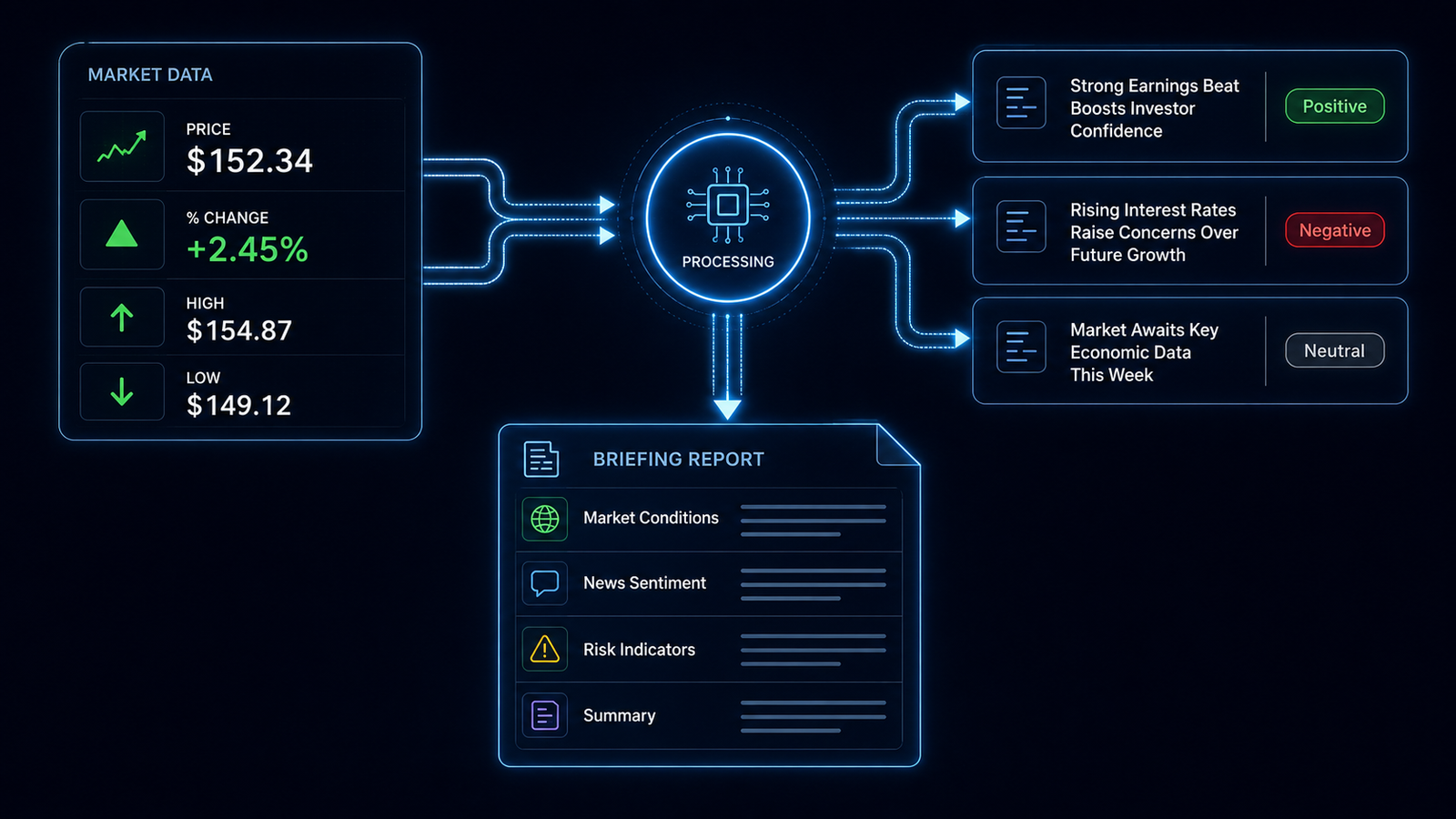
If you have ever wished you could type a stock ticker and instantly receive a structured briefing covering both price data and recent news, that is exactly what this agent demonstrates. It pulls market data from one source, fetches recent headlines from another, combines both into a single prompt, and asks an AI model to synthesize them into a report. The important boundary is this: the AI reads only what the agent retrieved. It is not asked to invent market context, make predictions, or give buy/sell advice. What comes back is a structured summary of the retrieved inputs, organized into four labeled sections every time.
What This Agent Does
The Financial Advisory Agent accepts a stock ticker symbol, fetches quote data from the Finnhub API, fetches recent news and sentiment labels from the Alpha Vantage News and Sentiment API, combines both data sets into one structured JSON prompt, and passes that prompt to a language model through a LiteLLM-compatible endpoint. The model returns a briefing with four sections: Market Conditions, News Sentiment, Risk Indicators, and Summary.
The compliance framing built into this agent is the most important architectural decision. The system message tells the model to summarize only the provided market and news data. It also tells the model not to add outside facts, predictions, buy/sell advice, or financial recommendations. That instruction is not cosmetic. It is the line between a data synthesis tool and something pretending to be an AI financial advisor.
The current repo is deliberately small. It does not use requests, the OpenAI SDK, dotenv, retry scaffolding, or extra formatting layers. The agent uses Python’s standard library to load settings, call APIs, parse JSON, and send the final prompt to the model. That makes the architecture easier to inspect: retrieve data, show the inputs, synthesize the briefing.
The Architecture: How It Works
The agent has five stages that run in sequence. First, it loads environment values from .env. Second, it validates the required settings and the ticker symbol. Third, it fetches market data from Finnhub. Fourth, it fetches recent news from Alpha Vantage. Fifth, it sends both retrieved data sets to the model and prints the briefing.
Think of this like preparing a briefing folder for an executive. One person pulls the quote sheet. Another pulls the news clips. Before anyone writes the summary, both documents are placed on the table. The analyst is then told: summarize only what is in this folder. Do not add outside rumors. Do not make recommendations. Do not pretend missing information exists.
That is the point of the architecture. The language model is not the data source. The APIs are the data sources. The model is the summarizer.
Stage 1: Environment Validation
Before any API call fires, the agent checks that the required configuration values are present: the LiteLLM base URL, model name, LiteLLM API key, Finnhub API key, Alpha Vantage API key, and ticker. If any are missing, the agent exits with a plain message listing exactly which variables are absent.
This matters because a missing API key should not turn into a confusing downstream failure. The agent checks the setup before spending API calls or asking the model to do anything.
REQUIRED_ENV = (
    "LITELLM_BASE_URL",
    "MODEL_NAME",
    "LITELLM_API_KEY",
    "FINNHUB_API_KEY",
    "ALPHA_VANTAGE_API_KEY",
    "TICKER",
)


def require_env() -> None:
    missing = [key for key in REQUIRED_ENV if not os.getenv(key)]
    if missing:
        raise SystemExit(f"Missing environment variables: {', '.join(missing)}")
    print(f"[INFO] Active model: {os.getenv('MODEL_NAME')}")
What This Code Is Actually Doing
This is the pre-flight checklist. Before the agent calls Finnhub, Alpha Vantage, or the language model, it checks whether the required settings exist. If FINNHUB_API_KEY is missing, the agent tells you that directly. It does not wait until the market data request fails with a vague API error.
For a beginner, think of this like checking that you have your passport, ticket, and ID before leaving for the airport. The trip has not started yet, so this is the cheapest moment to catch the problem.
Stage 2: Ticker Validation
The validation is intentionally simple: the ticker must be alphanumeric and no more than five characters. That keeps the agent from wasting calls on obviously invalid input without needing the regex module.
def ticker() -> str:
    value = os.getenv("TICKER", "").strip().upper()
    if not value.isalnum() or len(value) > 5:
        raise SystemExit("Ticker must be 1 to 5 letters or digits.")
    return value
What This Code Is Actually Doing
This function cleans and checks the ticker symbol. If someone types aapl, the function turns it into AAPL. If someone types a long sentence instead of a ticker, the function rejects it.
The regular expression is the gatekeeper. A regular expression is a pattern used to check text. Here, the pattern says: only letters and numbers, between one and five characters. That keeps the agent from wasting calls on obviously invalid input.
Stage 3: Market Data Retrieval
The agent calls Finnhub’s quote endpoint with the ticker symbol and API key. The current repo keeps the returned market block focused: ticker, current price, change percent, session high, and session low. If Finnhub does not return a current price, the agent treats that as a failed market lookup and stops.
def fetch_market_data(symbol: str) -> dict:
    data = get_json(
        "https://finnhub.io/api/v1/quote",
        {"symbol": symbol, "token": os.getenv("FINNHUB_API_KEY")},
    )
    if not data.get("c"):
        raise SystemExit(f"No market price returned for ticker: {symbol}")
    return {
        "ticker": symbol,
        "current_price": data.get("c"),
        "change_percent": data.get("dp"),
        "high": data.get("h"),
        "low": data.get("l"),
    }
What This Code Is Actually Doing
This function asks Finnhub for the quote data for one ticker. Finnhub returns short field names, so the agent translates them into readable labels. c becomes current price. dp becomes change percent. h becomes high. l becomes low.
The agent checks current price because a missing or zero price usually means the lookup did not produce usable market data. It stops before calling the language model because there is no point asking the model to summarize a briefing when the market data is missing.
Stage 4: News Retrieval
The agent then calls Alpha Vantage for recent news and sentiment. It takes up to three articles by default and keeps the title, summary, and overall sentiment label. If Alpha Vantage returns a rate-limit message, the agent exits cleanly and tells the user to try again later.
def fetch_news(symbol: str, limit: int = 3) -> list[dict]:
    data = get_json(
        "https://www.alphavantage.co/query",
        {
            "function": "NEWS_SENTIMENT",
            "tickers": symbol,
            "apikey": os.getenv("ALPHA_VANTAGE_API_KEY"),
            "limit": limit,
        },
    )
    if "Information" in data:
        raise SystemExit("Alpha Vantage rate limit reached. Try again later.")

    articles = [
        {
            "title": item.get("title"),
            "summary": item.get("summary"),
            "sentiment": item.get("overall_sentiment_label", "Neutral"),
        }
        for item in data.get("feed", [])[:limit]
    ]
    if not articles:
        raise SystemExit(f"No news returned for ticker: {symbol}")
    return articles
What This Code Is Actually Doing
This function collects the news side of the briefing. The agent is not scraping random pages or asking the model what it remembers. It is calling a data provider and saving specific fields from the response.
The rate-limit check matters because free APIs often stop returning normal data after a daily usage limit is reached. Instead of passing an incomplete or confusing response to the model, the agent stops and says what happened.
That is a small detail, but it is the difference between a brittle demo and a tool-shaped workflow. Bad input should stop at the gate.
Stage 5: The Compliance-Framed Model Call
The model call includes the compliance boundary directly inside the system message. The model is told to summarize only the provided market and news data, avoid outside facts, avoid predictions, avoid buy/sell advice, and state that the output is informational only.
def call_llm(prompt: str) -> str:
    payload = json.dumps(
        {
            "model": os.getenv("MODEL_NAME"),
            "messages": [
                {
                    "role": "system",
                    "content": (
                        "You summarize only the provided market and news data. "
                        "Do not add outside facts, predictions, buy/sell advice, or financial recommendations. "
                        "State that the output is informational only and not financial advice."
                    ),
                },
                {"role": "user", "content": prompt},
            ],
            "temperature": 0.2,
        }
    ).encode("utf-8")

    request = Request(
        os.getenv("LITELLM_BASE_URL").rstrip("/") + "/chat/completions",
        data=payload,
        headers={
            "Authorization": "Bearer " + os.getenv("LITELLM_API_KEY"),
            "Content-Type": "application/json",
        },
    )
    with urlopen(request, timeout=60) as response:
        return json.loads(response.read().decode("utf-8"))["choices"][0]["message"]["content"].strip()
What This Code Is Actually Doing
This is where the agent defines the model’s job. The model is not being asked, “What do you think about this stock?” It is being asked, “Summarize only these retrieved inputs.”
That difference matters. A model has financial language in its training data, but this architecture is designed to reduce the risk of the model mixing retrieved facts with its own background associations. It keeps the model in the role of briefing writer, not advisor.
Temperature is set to 0.2, which keeps the output more focused. In financial synthesis, I want clarity and restraint, not creativity.
Stage 6: The Combined Prompt Structure
Both data sets are combined into one JSON block before the model sees them. This is important because the model can read the market data and the news together rather than producing two disconnected summaries.
def build_prompt(market: dict, news: list[dict]) -> str:
    return (
        "Create a four-section briefing using only this JSON data:\n\n"
        f"{json.dumps({'market_data': market, 'news': news}, indent=2)}\n\n"
        "Sections: Market Conditions, News Sentiment, Risk Indicators, Summary."
    )
What This Code Is Actually Doing
This function builds the briefing folder. It places market data and news into one structured JSON object, then gives the model four section labels to use.
JSON is a structured format that both humans and programs can read. In this case, it works like a clean evidence packet. The model sees exactly what the agent retrieved, then writes the briefing from that packet.
The four-section structure also makes the output consistent. A founder, analyst, or operator reading the report knows where to look for price movement, where to look for news tone, where to look for risk signals, and where to find the final summary.
Stage 7: Verified Inputs Before the Briefing
The agent prints the retrieved market and news data before printing the model briefing. That design choice matters. You can see what went into the model before reading what came out of it.
print("\nVERIFIED INPUTS")
print(json.dumps({"market_data": market, "news": news}, indent=2))
print(f"\nFINANCIAL BRIEFING: {symbol}")
print(call_llm(build_prompt(market, news)))
What This Code Is Actually Doing
This is the transparency step. The agent shows the raw retrieved inputs first, then prints the AI-generated briefing.
Think of it like seeing the receipts before reading the accountant’s summary. If the summary sounds strange, you can look back at the inputs and ask whether the data was incomplete, outdated, rate-limited, or simply not enough to support a strong conclusion.
That is the architecture I want in financial contexts: retrieved inputs visible first, model synthesis second.
The Model-Agnostic Layer
Every AI call routes through a LiteLLM-compatible endpoint. The agent has no provider-specific SDK in the code. It sends a standard HTTP request to the configured endpoint and receives a response. Switching providers happens through MODEL_NAME and the LiteLLM routing layer, not through changes to the financial logic.
That is the right separation. The agent’s job is to fetch market data, fetch news, prepare the prompt, and enforce the informational-only boundary. The model endpoint’s job is to route the completion request. Those jobs should not be tangled together.
The current repo has no Python package dependencies. That is not a gimmick. It means the teaching version stays focused on architecture instead of installation problems.
What I Would Do Differently
The current build makes two API calls one after the other. The agent asks Finnhub for quote data, waits for the response, then asks Alpha Vantage for news, waits for that response, and only then moves forward. This is sequential execution. It is like calling two people by phone and finishing the first call completely before dialing the second.
A production version would likely make both calls at the same time. That is parallel execution. You place both calls at once, and the total wait time becomes closer to the slower call instead of the sum of both calls. For one ticker, the difference is small. For a portfolio of twenty companies, the difference compounds quickly.
I would also add stronger data freshness context. A briefing based on three articles from the last hour should not feel the same as a briefing based on three older articles. The current agent includes titles, summaries, and sentiment labels. A stronger version would surface timestamps and make the model explain how fresh the news inputs are.
The market data block is also intentionally small. It includes current price, percent change, high, and low. A production version might use a paid data provider or expanded endpoint that includes volume, previous close, opening price, sector comparison, and historical trend data. The architecture would not change. The fetch_market_data function would change.
The largest future improvement is source traceability. The current model sees the retrieved inputs, but a more serious briefing system would preserve article URLs, timestamps, provider names, and possibly an input hash for audit. In finance, the question is never just “what did the agent say?” It is “what exact source material did the agent summarize?”
What This Means
If you track competitors, monitor acquisition targets, or need regular briefings on companies in your sector, this agent reduces the first step of that workflow to a ticker symbol. It gives you a structured picture of where the stock is trading, what recent news says, where risk signals may appear, and how the combined data reads.
The compliance framing matters just as much as the automation. The briefing is explicitly a synthesis of retrieved data, not an AI-generated financial opinion. That distinction is relevant if you are presenting information to colleagues, clients, or partners and need to be clear about what the source of the analysis actually is.
For clients who need regular competitive intelligence briefings, sector monitoring, or pre-meeting research on specific public companies, this agent is a practical starting point. Use it to get oriented. Verify before acting. Bring a qualified professional into any decision involving real capital, regulated activity, fiduciary duties, or client funds.
The Same Architecture, Different Industries
The pattern this agent uses is not specific to finance. Two data sources feed one language model, and the model synthesizes them into a structured briefing. That pattern can be adapted to almost any industry where you need to combine live data with recent narrative context.
Real Estate Market Monitor. Instead of a stock ticker, the agent accepts a city and neighborhood. It fetches listing data such as average price per square foot, days on market, and inventory levels. Then it fetches local news about zoning changes, school developments, infrastructure projects, and crime reports. The model produces Market Conditions, Local News Sentiment, Risk Indicators, and Summary. The output is a research briefing, not real estate advice.
Supplier Risk Monitor. A procurement team enters a supplier name or ticker. The agent fetches business health indicators from one source and recent news from another: labor issues, regulatory actions, leadership changes, earnings warnings, or shipping disruptions. The model produces a supplier risk briefing. The procurement team still decides. The agent surfaces signals early.
Clinical Trial and Biotech News Monitor. A healthcare investor, operator, or hospital administrator enters a company name, drug name, or therapy area. The agent fetches regulatory or trial-status data from one source and recent news from another. The briefing covers current status, news sentiment, risk indicators, and a summary. Nothing in the output is medical or investment advice. It is an orientation tool for professionals who still need expert review.
Geopolitical Risk Briefing for International Business. A company considering expansion enters a country name. The agent fetches economic indicators from one source and recent political or regulatory news from another. The briefing covers economic conditions, news sentiment, risk indicators, and a summary. It helps a founder or operations director ask better questions before speaking with legal counsel, local partners, or international business specialists.
Employee Sentiment and Labor Market Monitor. An HR director enters a job category and location. The agent fetches salary or job-posting data from one source and labor-market news from another. The model summarizes hiring conditions, news sentiment, risk indicators, and next context for a compensation or recruiting discussion. It prepares the conversation. It does not replace judgment.
In every example, the architecture is the same. Two data sources. One model. One structured briefing. The APIs change. The labels change. The compliance framing changes by industry. But the core pattern stays intact: retrieve the facts first, show the inputs, then ask the model to synthesize only what was provided.
That is reusable architecture. You build the pattern once, understand why each boundary exists, and then adapt it to new problems by swapping the data sources.
Tools Used
- Finnhub API (free tier): finnhub.io
- Alpha Vantage News and Sentiment API (free tier): alphavantage.co
- LiteLLM (MIT): github.com/BerriAI/litellm
- python-dotenv (BSD-3): github.com/theskumar/python-dotenv
- requests (Apache 2.0): github.com/psf/requests
- NosisTech Agent Engineering — github.com/nosistech/agent-engineering
Keep reading in this series
Previous build: #21 Conflict Resolution Agent: When Two AIs Disagree
Next build: #23 CrewAI: 3-Agent Content Crew
All 56 builds: 50+ Agent Patterns & Builds
(c) 2026 NosisTech LLC. Licensed under CC BY 4.0. Use freely, just credit us.