
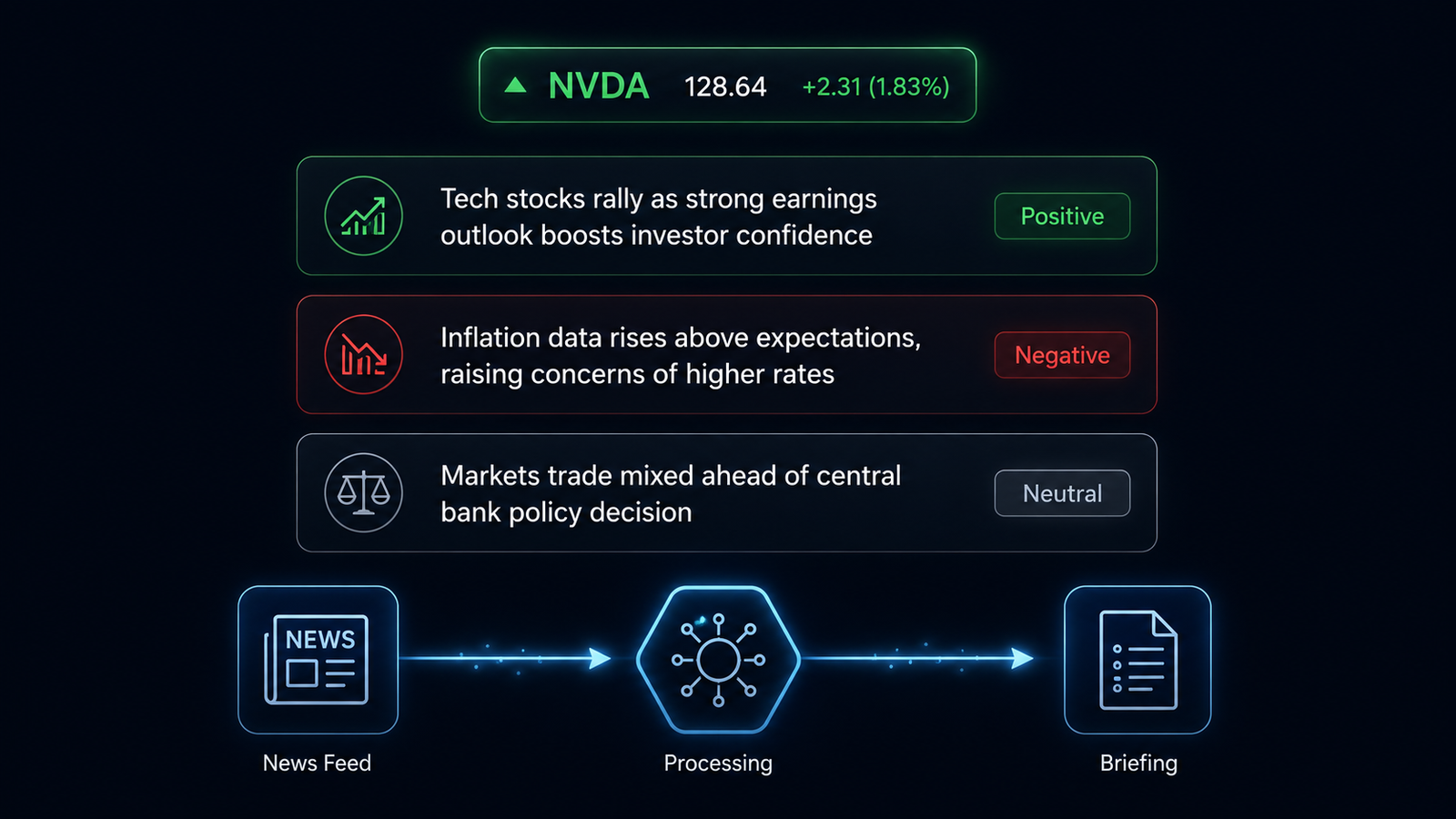
This Financial News Agent fetches live news for a stock ticker, reads the retrieved headlines and summaries, and returns a structured briefing with a sentiment label and a clear summary of what the news actually says. No opinions from the AI. No invented data. Only what the articles say, organized into a format a business reader can use quickly.
What This Agent Does
The Financial News Agent accepts a stock ticker symbol, fetches the five most recent news articles from the Alpha Vantage News and Sentiment API, and passes that content to a language model via LiteLLM. The model reads the articles and returns three things: an overall sentiment label for the ticker (Positive, Negative, or Neutral), a three-sentence plain-English summary of what the news says, and a numbered list of the top three headlines.
The agent does not generate financial opinions from its own knowledge. It is a summarizer, not an advisor. This distinction is architectural, not cosmetic. The system prompt given to the language model explicitly instructs it to report only what the provided articles say, and to avoid price predictions, investment recommendations, or any financial judgment it generates independently. For NosisTech, where governance and compliance are core to everything we build, this framing is the first design decision, not an afterthought.
Why I Built This
NosisTech works with founders and executives who need to stay informed about companies, sectors, and market conditions without spending an hour each morning reading financial news. The problem is not access to information. The problem is synthesis. There is too much, it arrives too fast, and the signal gets buried in the noise.
I needed an agent that could take a ticker symbol and return a clear, structured answer to the question: what is the market saying about this company today? Not a prediction. Not a recommendation. Just a faithful summary of what the news actually contains, labeled and organized so a non-technical professional can act on it in thirty seconds.
This agent is also the foundation for something larger. When combined with the Market Data Agent from Post 3, these two components form the data layer for the Financial Advisory Agent in Block 4. I am building modular pieces now so that the advanced builds later have clean inputs to work with.
The Architecture: How It Works
The agent has four stages that run in sequence. Understanding each stage is more important than reading the code, so I will explain each before showing the relevant section.
Stage 1: Environment Validation
Before the agent makes any network call, it checks that every required configuration value is present. If anything is missing, it prints exactly which variables are absent and exits. No network calls fire, no API credits are consumed, and no confusing error messages appear. The agent either starts clean or tells you precisely why it cannot start.
Stage 2: News Retrieval
The agent calls the Alpha Vantage News and Sentiment API with the ticker symbol. Alpha Vantage returns a structured JSON response containing headlines, article summaries, and a pre-scored sentiment label for each article. The agent uses this pre-scored label as one input but does not rely on it exclusively. The language model reads the full headlines and summaries and forms its own assessment based on the content, not just the scores.
One specific check happens here before anything else proceeds. The Alpha Vantage free tier will return an “Information” key in the response instead of a news feed when the daily request limit is reached. The agent catches this before passing anything to the language model, prints a plain-English message explaining what happened, and exits cleanly. Without this check, the agent would pass an error message to the language model and receive a confused or fabricated response in return.
Stage 3: Formatting
The retrieved articles are formatted into a structured text block before being sent to the language model. Each article appears as a labeled set of three fields: headline, summary, and sentiment label. This formatting step matters because it gives the language model clean, consistent input rather than raw JSON. The model spends its processing on analysis, not on parsing a data structure.
Stage 4: LLM Analysis via LiteLLM
The formatted news block is sent to the language model through the LiteLLM proxy. The system prompt instructs the model to act as a summarizer only. The user prompt asks for the three outputs: sentiment label, three-sentence summary, and top headlines. The response is printed directly to the terminal.
The Model-Agnostic Layer
Every agent in this series routes model calls through LiteLLM, a proxy that sits between the agent code and the AI provider. The agent itself does not need to know whether it is talking to DeepSeek, ChatGPT, Gemini, Claude, or a local model. It sends a standard OpenAI-compatible request to the LiteLLM endpoint, and LiteLLM handles the provider behind it.
Switching providers requires changing one line in the .env file. Nothing in the code changes. I tested this agent with deepseek-v4-pro, ChatGPT, a local model, and gemini-flash. The wording changed between models, but the structure stayed consistent, which is exactly what this architecture is supposed to prove.
The Build: Step by Step
Step 1: Environment Loading
The agent uses python-dotenv to load the .env file before any other code runs. This is a small detail with significant consequences. Without it, os.getenv() reads system environment variables only, and the .env file is silently ignored. The agent would start and immediately report every variable as missing.
from dotenv import load_dotenv

load_dotenv()
What this code is actually doing
load_dotenv() reads the .env file in the current directory and loads every key-value pair into the environment, as if you had set them manually in your terminal before running the script. After this line runs, os.getenv("MODEL_NAME") returns the value you put in .env. Without this line, it returns nothing.
Step 2: Ticker Validation
def validate_ticker(ticker: str) -> str:
    """Clean the ticker symbol and ensure it is 1-5 alphanumeric characters."""
    cleaned = ticker.strip().upper()
    if not cleaned.isalnum():
        raise ValueError("Ticker symbol must contain only letters and numbers.")
    if not (1 <= len(cleaned) <= 5):
        raise ValueError("Ticker symbol must be 1 to 5 characters long.")
    return cleaned
What this code is actually doing
Before the agent makes any API call, it cleans the ticker symbol the user provided. It strips any accidental spaces, converts lowercase letters to uppercase, and checks two rules: the ticker must contain only letters and numbers, and it must be between one and five characters long. If either check fails, the agent stops immediately with a plain-English message. This prevents malformed input from reaching the Alpha Vantage API and producing a confusing error response.
Step 3 replacement snippet:
def fetch_news(ticker: str, api_key: str, limit: int = 5) -> list[dict[str, str]]:
    """Retrieve recent Alpha Vantage news articles for a ticker."""
    url = "https://www.alphavantage.co/query"
    params = {
        "function": "NEWS_SENTIMENT",
        "tickers": ticker,
        "apikey": api_key,
        "limit": limit,
    }

    response = requests.get(url, params=params, timeout=10)
    response.raise_for_status()
    data = response.json()

    if "Information" in data:
        raise RuntimeError(
            "Alpha Vantage API limit reached or usage restricted. "
            f"The API responded with: {data['Information']}"
        )
What this code is actually doing
The agent sends a request to Alpha Vantage with the ticker, API key, and article limit as structured query parameters. That is cleaner than manually building one long URL string. After the response comes back, the agent converts it to JSON and immediately checks for the “Information” key. Alpha Vantage uses that key when the free tier limit is reached or the request is restricted. Catching it here prevents the agent from sending an API error message into the language model and pretending the output is a valid financial briefing.
Step 4: The Compliance-Framed System Prompt
system_prompt = (
    "You are a financial news summarizer. "
    "Your role is to summarize only the news content provided to you. "
    "Do not generate price predictions, investment recommendations, "
    "or financial opinions from your own knowledge. "
    "Report only what the provided articles say."
)
What this code is actually doing
This is the most important line in the entire agent. The system prompt is the instruction set given to the language model before it sees any news content. By explicitly telling the model that its role is to summarize only the provided content and to avoid generating opinions from its own knowledge, the architecture enforces a separation between retrieval and generation. The model is not being asked what it thinks about Apple. It is being asked what these five articles say about Apple. That distinction is the difference between a summarization tool and an AI advisor, and it matters enormously for how this output can be used in a professional context.
What I Would Do Differently
The current build fetches five articles and passes all of them to the language model in a single call. In a production deployment, I would add a relevance filter before the LLM call. Not every article returned for a ticker is equally useful. A brief mention of Apple in a broader technology sector story carries less signal than a dedicated earnings analysis. A relevance scoring step between retrieval and formatting would improve briefing quality without changing the architecture.
I would also add persistent logging. Right now the briefing is printed to the terminal and lost. A production version would write each briefing to a timestamped file or a simple database, so that sentiment trends over time become visible. Watching how sentiment shifts across a week of briefings is more valuable than any single snapshot.
The Alpha Vantage free tier allows 25 requests per day. For personal use this is sufficient. For a team environment, a paid tier or a different news data provider would be necessary. The agent architecture does not change if the data source changes. Only the fetch_news function would need to be updated.
One mistake I cleaned up after testing was the dependency list. The agent talks to LiteLLM through the OpenAI-compatible API, but it does not need to import the litellm Python package directly. The code imports openai, python-dotenv, and requests, so the requirements file should say exactly that. Keeping dependencies honest matters because beginners should be able to install the project and understand why each package is there.
A Note on API Keys and Free Access
The Alpha Vantage News and Sentiment API is free to use with registration. You can get a key at alphavantage.co in about 60 seconds. The free tier allows 25 requests per day, which is enough to test this agent thoroughly and run it daily for personal use.
During my own testing I noticed that a small number of unauthenticated requests appeared to return data before the key was enforced. I would not rely on this behavior. Register for the free key before running the agent seriously. The agent is built to handle the rate limit error gracefully if you do hit it, but a registered key avoids the issue entirely.
What This Means
If you run a business and need to track what the market is saying about a company, a competitor, or a potential partner, this agent gives you a structured answer in seconds. You type a ticker symbol. You get a sentiment label, a three-sentence summary, and the three most relevant headlines. No login to a financial platform. No scanning through fifteen articles. No subscription to a news aggregator.
The compliance framing built into this agent also matters for professional use. The briefing it produces is explicitly a summary of retrieved news content, not an AI-generated financial opinion. That distinction is relevant if you are using this output to inform business decisions and need to be clear about what the source of that information actually is.
For clients who track competitor activity, monitor market conditions around potential acquisitions, or need daily sector briefings, this agent is a practical tool that can be running in a morning workflow within an afternoon of setup.
Tools Used
- Alpha Vantage News and Sentiment API: alphavantage.co
- LiteLLM (MIT): github.com/BerriAI/litellm
- python-dotenv (BSD-3): github.com/theskumar/python-dotenv
- requests (Apache 2.0): github.com/psf/requests
- NosisTech Agent Engineering — github.com/nosistech/agent-engineering
Keep reading in this series
Previous build: #3 Market Data Agent: Compliance-First Stock Pipeline
Next build: #5 Async Standup Summarizer: AI Team Reports Without Meetings
All 56 builds: 50+ Agent Patterns & Builds
(c) 2026 NosisTech LLC. Licensed under CC BY 4.0. Use freely, just credit us.