
When you give a generalist agent a vague instruction, it produces a generic result. Not because the model is weak. Because the model did not know enough about your specific situation to do better. The quality ceiling was set at the input, not the output.
I kept running into the same problem: the more complex the task, the more the agent needed to ask before acting, and nothing I had seen made that a first-class behavior.
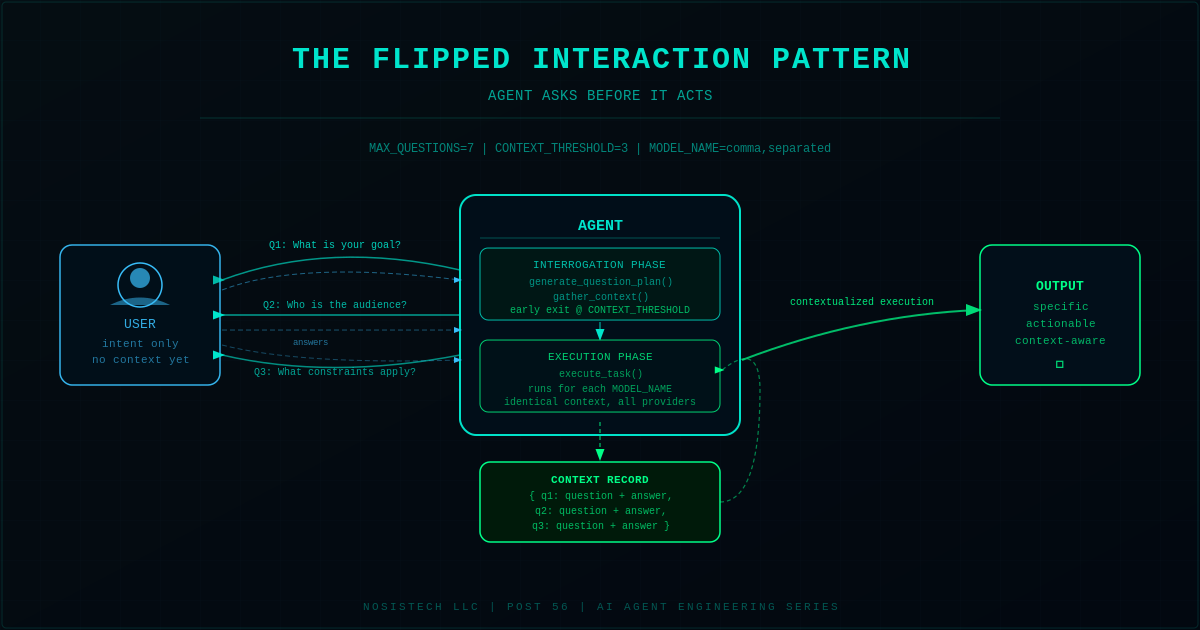
The Flipped Interaction Pattern flips the default. The agent drives the conversation first. It identifies what it does not know, asks targeted questions, and only executes after it has enough context to do the task well.
The Interrogation Desk
Think about how a consultant works on the first call with a new client. The client says: “We need to improve our sales process.” A good consultant stops and asks questions. What does your current process look like? Where does it break down? What have you already tried? What does success look like in six months?
The consultant is not being slow. The consultant is gathering the specific context that separates a generic recommendation from one that actually fits the client’s situation. The questions are not obstacles. They are the work.
This is the Flipped Interaction Pattern. The agent is the consultant. Before it touches your task, it runs an interrogation phase. It generates a list of the most important things it needs to know, asks them in order, collects your answers, and uses that structured context to execute. The output is no longer a generic response to a vague prompt. It is a specific response to a fully contextualized task.
The pattern has two configurable controls. MAX_QUESTIONS sets the ceiling on how many questions the agent will ask (default 7). CONTEXT_THRESHOLD sets the early exit point: if the agent has collected this many substantive answers, it stops asking and proceeds. Both are environment variables. You tune them without touching the code.
Vocabulary You Need
Interrogation phase: the part of the agent’s loop where it gathers information before taking any action. This is the flip: normally the action comes first.
Context record: the structured dictionary of questions and answers the agent builds during the interrogation phase. This is what gets passed to the execution model. Better context record, better output.
Early exit threshold: the minimum number of answers at which the agent decides it has enough to proceed. A ceiling prevents interrogation fatigue. A floor prevents the agent from executing on almost nothing.
Model-agnostic: the agent works identically whether the model is Gemini, DeepSeek, Claude, or any other provider. Change the .env file. Nothing else changes.
What This Is Not
This is not a chatbot. It does not have persistent memory between sessions. It does not maintain a conversation history after the task completes. It does not learn from prior runs.
This is not a multi-agent system. One agent does both jobs: interrogation and execution. The multi-agent version, where a dedicated interrogation agent hands context to a dedicated execution agent, is a natural extension. That is a future build.
This is not a production system. It runs in a terminal. There is no web interface, no database, no API endpoint. Those layers can be added. They are not the point of this post.
Why I Built This
I kept seeing the same problem across every agent I tested. The task was clear. The model was capable. But the output was generic because the agent had no way to ask what it actually needed to know before starting.
The usual fix is to tell users to write better prompts. The agent should do that work, not the user. If a human expert would ask questions before acting, the agent should too. The pattern that makes that behavior systematic did not exist as a clean, small, inspectable implementation.
What Happened
What actually happened: the first version used litellm direct instead of the openai SDK pointed at the LiteLLM proxy. It did not match the series standard and had to be rewritten before testing.
What surprised me: DeepSeek timed out on the execute phase at 30 seconds even though it had already received the question plan and context. Increasing timeout to 60 seconds fixed it. The lesson is that reasoning models under load take longer than the default timeout assumes.
What I would change next: the current implementation generates all questions upfront in one planning call, then asks them in order. A genuinely adaptive version would regenerate the next question after each answer, using what it just learned to decide what to ask next. That is a more expensive loop but produces materially better context for complex tasks.
Why this matters: the errors were all about infrastructure, not logic. The pattern is sound. The friction was in wiring the standard stack correctly. That is typical of original builds with no source repo to reference.
Errors I Hit During This Build
Error 1: httpx.ReadTimeout on DeepSeek execute call.
What the error said: httpx.ReadTimeout after 30 seconds with no response from the DeepSeek endpoint.
What caused it: the OpenAI client was initialized with the default timeout of 30 seconds. DeepSeek V4 Pro under load takes longer than 30 seconds to respond when given a contextualized execution prompt.
How it was fixed: changed the OpenAI client initialization to timeout=60.0. Each model now has 60 seconds to respond. Added a try/except block around each model’s execute_task call so one model timing out does not crash the run for the next model.
The Architecture: How It Works
The agent has three phases: configure, interrogate, execute.
Phase 1 is configuration. The agent reads required environment variables on startup. If any are missing, it prints exactly which ones are missing and exits before making any API call. The user does not see a stack trace. They see a plain English message.
Phase 2 is interrogation. This is the flip. Before the user’s task is touched, the agent uses the first model in MODEL_NAME to generate a question plan. The model is asked: given this goal and whatever context has already been gathered, what are the most important questions I need answered to do this well? The result is a ranked list of up to MAX_QUESTIONS questions. The agent asks them one at a time. After each answer, it checks whether CONTEXT_THRESHOLD has been reached. If yes, it stops and proceeds. If not, it continues to the next question.
Phase 3 is execution. Once context is gathered, the agent runs execute_task for each model in the MODEL_NAME list. Every model gets the identical context record. You see what each model does with the same information. Provider differences are visible in the output side by side.
Here is the configuration and client setup:
REQUIRED_ENV_VARS = ["LITELLM_BASE_URL", "MODEL_NAME", "LITELLM_API_KEY"]
MAX_QUESTIONS = int(os.getenv("MAX_QUESTIONS", "7"))
CONTEXT_THRESHOLD = int(os.getenv("CONTEXT_THRESHOLD", "3"))

def load_config():
    """Exit with a clear message if required environment variables are missing."""
    missing = [v for v in REQUIRED_ENV_VARS if not os.getenv(v)]
    if missing:
        print("Missing environment variables: " + ", ".join(missing))
        print("Copy .env.template to .env and fill in all values.")
        sys.exit(1)
    model_names = [m.strip() for m in os.getenv("MODEL_NAME", "").split(",") if m.strip()]
    if not model_names:
        print("MODEL_NAME must contain at least one model name.")
        sys.exit(1)
    print("Active models: " + ", ".join(model_names))
    return os.getenv("LITELLM_BASE_URL"), model_names, os.getenv("LITELLM_API_KEY")
What this code is actually doing
Think of this as the agent’s pre-flight checklist before it is allowed to take off. The first block declares which environment variables are required. If any are missing when the agent starts, it prints which ones are missing and stops cleanly. No crash, no stack trace, just a plain English message.
MAX_QUESTIONS and CONTEXT_THRESHOLD are read from the .env file with default values as fallback. This means you can tune the agent’s behavior from the .env file without touching the code.
The load_config function handles the comma-separated MODEL_NAME. It splits the string on commas, strips whitespace from each piece, and returns a list. If you put gemini-flash,deepseek-v4-pro in your .env file, you get back the list [“gemini-flash”, “deepseek-v4-pro”]. The rest of the agent iterates over that list. Adding a third model means adding one comma-separated name to the .env file.
Here is the question planning function:
def generate_question_plan(client, model, goal, context):
    """Ask the model what information it needs to complete the goal."""
    prompt = (
        "Goal: " + goal + "\n\n"
        "Context already gathered: " + (json.dumps(context) if context else "none") + "\n\n"
        "List the most important questions you need answered to complete this goal well. "
        "Return a JSON object with a single key 'questions' containing an array of strings. "
        "Maximum " + str(MAX_QUESTIONS) + " questions, ranked by importance. Return only valid JSON."
    )
    raw = call_model(client, model, [{"role": "user", "content": prompt}])
    try:
        start = raw.find("{")
        end = raw.rfind("}") + 1
        data = json.loads(raw[start:end])
        return data.get("questions", [])[:MAX_QUESTIONS]
    except (json.JSONDecodeError, ValueError):
        lines = [ln.strip("- 0123456789.").strip() for ln in raw.splitlines() if ln.strip()]
        return [ln for ln in lines if len(ln) > 5][:MAX_QUESTIONS]
What this code is actually doing
This function is the interrogation planner. It sends the model a single message: here is the goal, here is what I already know, tell me what you need to know to do this well. The model returns a JSON object with a ranked list of questions.
The try/except block handles reality: not every model returns perfect JSON every time. The primary path extracts the JSON object by finding the first open brace and last close brace, then parsing what is between them. The fallback path strips common line-formatting characters and treats each non-empty line as a question. Either way, the function returns a clean list.
The MAX_QUESTIONS cap is enforced at the slice: [:MAX_QUESTIONS]. Even if the model returns fifteen questions, only the first seven (or whatever MAX_QUESTIONS is set to) are used. This keeps the interrogation phase predictable in length.
Here is the interrogation loop:
def gather_context(client, model, goal):
    """Run the interrogation phase: generate questions and collect answers."""
    context = {}
    questions_asked = 0

    print("Generating question plan...\n")
    questions = generate_question_plan(client, model, goal, context)

    if not questions:
        print("No questions generated. Proceeding directly to execution.\n")
        return context

    for question in questions:
        if questions_asked >= MAX_QUESTIONS:
            break

        print("Question " + str(questions_asked + 1) + ": " + question)
        answer = input("Your answer: ").strip()

        if answer:
            context["q" + str(questions_asked + 1)] = {
                "question": question,
                "answer": answer,
            }
            questions_asked += 1

        if questions_asked >= CONTEXT_THRESHOLD:
            print("\nSufficient context gathered. Proceeding to execution.\n")
            break

    return context
What this code is actually doing
This is the part that makes the agent different. Instead of immediately acting on the user’s input, the agent pauses and runs the question plan it just generated. It asks questions one at a time, waits for an answer, stores the question and answer together in a dictionary, and increments a counter.
The early exit check runs after each answer is stored. If the counter reaches CONTEXT_THRESHOLD, the loop breaks and the function returns what it has. The agent does not wait until all MAX_QUESTIONS are asked. It stops when it has enough. This is the behavior that keeps the interaction from feeling like a form.
If the user skips an answer by pressing Enter with no text, that question is skipped without incrementing the counter. The agent moves to the next question without counting a blank as a useful answer.
Here is the execution function and main loop:
def execute_task(client, model, goal, context):
    """Complete the original goal using all gathered context."""
    if not context:
        context_text = "No additional context provided."
    else:
        context_text = "\n".join(
            "Q: " + v["question"] + "\nA: " + v["answer"] for v in context.values()
        )
    prompt = (
        "Goal: " + goal + "\n\n"
        "Context gathered:\n" + context_text + "\n\n"
        "Complete the goal. Be specific and actionable."
    )
    return call_model(client, model, [{"role": "user", "content": prompt}])


if __name__ == "__main__":
    base_url, model_names, api_key = load_config()
    client = create_client(base_url, api_key)

    goal = input("What do you want to accomplish? ").strip()
    context = gather_context(client, model_names[0], goal)

    for model_name in model_names:
        print("\nModel: " + model_name)
        try:
            result = execute_task(client, model_name, goal, context)
            print("\n=== Result ===")
            print(result)
        except Exception as error:
            print("Model call failed: " + str(error))
What this code is actually doing
The execute_task function formats the gathered context into a readable prompt. Each question and answer pair gets its own Q: and A: lines. The model receives the original goal plus the complete context record and is told to be specific and actionable. The specificity instruction matters: without it, the model may acknowledge the context without actually using it to sharpen the output.
The main loop runs execute_task once for every model in the list. Both models receive the identical context. This means you can compare Gemini’s response and DeepSeek’s response to the same contextualized task in one run. The context gathering uses only the first model in the list, which keeps the interrogation phase consistent regardless of how many execution models are configured.
The try/except block around each model call means one model failing does not crash the entire run. If DeepSeek times out, Gemini’s result still prints. The error message is plain English: “Model call failed:” followed by the specific error. No stack trace exposed to the user.
What to Watch When You Run It
On startup, the agent prints the active models. This confirms that MODEL_NAME was parsed correctly and both providers are loaded. If only one model name prints, check that your .env has no extra spaces around the comma.
During the interrogation phase, watch the question numbering. If the agent prints “Sufficient context gathered” after question 3, CONTEXT_THRESHOLD is working. If it continues past question 3, check that your answers were not blank. Blank answers do not increment the counter.
On the execution phase, watch the timing difference between providers. Gemini tends to respond within a few seconds. DeepSeek V4 Pro can take up to 45 seconds for a complex execution prompt. Both timeouts are expected. The 60-second timeout in the client initialization handles this.
Compare the two outputs side by side. The same context record goes to both models. Notice whether one model integrates the context more specifically than the other. Notice whether one model adds unsolicited information that was not requested. These differences are not bugs. They are the provider comparison the architecture is designed to surface.
How to Run It
Clone the repo and navigate to the post-56 folder:
git clone https://github.com/nosistech/agent-engineering
cd agent-engineering/post-56-flipped-interaction-pattern
Copy the template and fill in your values:
cp .env.template .envYour .env file should look like this (using your actual model names and credentials):
LITELLM_BASE_URL=http://localhost:4000
MODEL_NAME=gemini-flash,deepseek-v4-pro
LITELLM_API_KEY=your-key-here
MAX_QUESTIONS=7
CONTEXT_THRESHOLD=3
Install dependencies and run:
pip install -r requirements.txt
python agent.py
The agent will ask what you want to accomplish, run the interrogation phase, and then execute with each model in your MODEL_NAME list.
Why This Pattern Matters Beyond This Post
The Flipped Interaction Pattern is not a novelty. It is infrastructure.
Every intake process in every professional domain is a manual version of this pattern. A law firm intake call, an insurance FNOL, a clinical triage, a sales qualification call, a compliance risk assessment, a requirements gathering session. Every one of these is a human running a structured interrogation to gather context before acting.
The pattern can assist. The question bank changes. The execution prompt changes. The output format changes. The architecture does not.
That is what a foundational pattern looks like. You build it once. Then you configure it for every vertical that needs it.
Tools Used
Python 3.14: https://www.python.org
LiteLLM 1.83.7 (MIT): https://github.com/BerriAI/litellm
python-dotenv 1.0.1 (BSD): https://github.com/theskumar/python-dotenv
OpenAI Python SDK (MIT, installed via LiteLLM): https://github.com/openai/openai-python
NosisTech Agent Engineering (MIT): https://github.com/nosistech/agent-engineering
Disclaimer
This project is an educational build for learning and architectural review. It is not legal, compliance, security, financial, or professional advice. It is not a production system, certification, audit result, or guarantee of any outcome. For real environments, consult qualified professionals and validate independently.
(c) 2026 NosisTech LLC. Licensed under CC BY 4.0. Use freely, just credit us.