
Disclaimer: This article documents a personal technical experiment on my own infrastructure. Configurations reflect my specific environment and should not be treated as security advice or guaranteed protection. Always validate independently and consult qualified security professionals before implementing any security measure. NosisTech LLC accepts no liability for outcomes arising from use of this content.
Browser Use is known for giving AI agents the ability to operate websites through a real browser. The important architecture lesson, though, is not the browser itself. The important lesson is the loop.
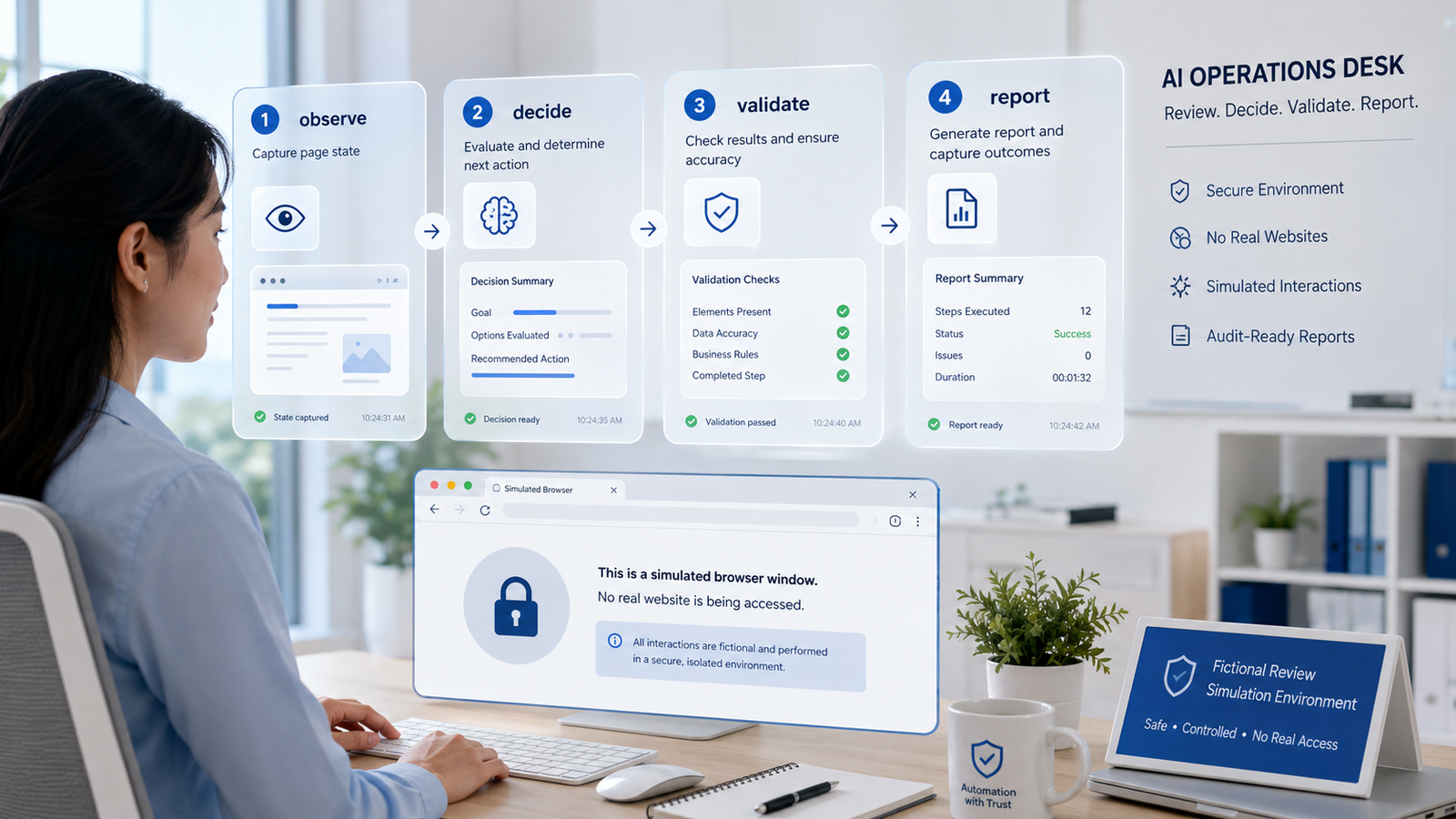
Observe the page. Decide the next action. Validate the action. Report what happened.
For this educational demo, I kept that loop and removed the risky part. No browser opened. No website was contacted. No scraping, payment, login, captcha, proxy, or credential workflow exists in this demo.
What This Agent Does
This agent reads fictional browser page states and asks a model to choose one next action.
A page state is a small text version of a webpage. It lists the page name, the task goal, the visible elements, the allowed actions, the blocked actions, and a short piece of visible text.
The model can propose actions such as TYPE, CLICK, EXTRACT, DONE, NEEDS_REVIEW, or BLOCKED. Then local Python code checks the action before accepting it.
In my test, the agent reviewed three fictional pages:
Northstar Customer Portal Search: the model chose TYPE into the search input.
Harbor Vendor Profile: the model chose EXTRACT from visible vendor text.
Ridgeway Checkout Review: the local validation layer returned NEEDS_REVIEW because the model response touched a blocked browser-automation area.
The agent demonstrates browser-style planning without controlling a real browser.
The Dispatch Desk
The best way to understand this build is to picture a dispatch desk.
A worker at the desk receives a job ticket. The ticket says what page is visible, what the objective is, and which actions are allowed. The worker does not run into the building and start pressing buttons. The worker first reads the ticket and proposes the next step.
Then a supervisor checks the proposed step.
If the action is allowed, the plan gets recorded. If the action asks for something risky, like payment, credentials, deletion, captcha handling, or scraping, the supervisor stops it and sends it to review.
That is what this agent does.
Browser Use is the full field team with browser control, sessions, page interaction, and action execution. My rebuild is the dispatch desk. It studies the decision layer without sending anyone into a real building.
That is the safer architecture lesson.
Vocabulary You Need
Browser agent means an AI system designed to use a browser as a tool. In a full system, that may involve reading pages, clicking buttons, typing into fields, and extracting information.
Page state means a simplified snapshot of what the agent can see. In this build, the page state is just a Python dictionary, not a live website.
Action validation means checking the model’s proposed action before accepting it. The model can suggest an action, but Python rules decide whether that action is allowed in the demo.
LiteLLM means the routing layer that lets the same code run with different model providers. I tested this agent with DeepSeek and Gemini by changing the environment configuration.
Fictional page state means the demo uses invented pages and invented companies. That keeps the build focused on architecture rather than real websites, accounts, or data.
What This Is Not
This is not a Browser Use replacement.
This is not a scraping tool.
This is not a captcha bypass workflow.
This is not credential automation.
This is not a payment automation system.
This is not production browser automation guidance.
This is an educational rebuild. It shows how I separated browser-style reasoning from browser execution so the decision pattern can be studied safely.
Why I Built This
I built this because browser agents are one of the most powerful categories in agentic AI.
They also sit directly on top of real-world risk. A browser agent can see pages, press buttons, enter text, and trigger workflows that affect accounts, money, records, and customers.
That is exactly why I did not start by building a live browser controller.
I wanted the smaller architecture lesson: how does an AI decide the next browser-style action, and how can local code review that action before anything real happens?
The answer is a planning gate.
The model proposes. The local validator checks. The terminal prints what happened.
That is the standard I wanted to isolate.
What Actually Happened
What broke: The first draft had corrupted punctuation, broad exception handling, and README wording that needed cleanup. I fixed those before testing.
What surprised me: The local validator became the most important part of the build. The browser idea was interesting, but the real lesson was whether the model’s proposed action belongs in the allowed action list.
What I would change next: I would add a small workflow memory registry. That would let the planner remember approved action paths for repeated fictional page states and send changed states to review.
Why this matters: Browser agents are not only an automation problem. They are a control problem, because each proposed action needs a boundary before it touches real systems.
The Architecture: How It Works
The build has five layers.
First, it loads environment variables from .env. This keeps the model name, LiteLLM base URL, and API key outside the code.
Second, it creates three fictional page states. Each one acts like a static snapshot of a browser page.
Third, it asks the model for one next action.
Fourth, it parses the model response as JSON, which is a structured format that code can inspect.
Fifth, it validates the action locally. If the proposed action is not allowed, or if it mentions risky browser automation content, the agent returns NEEDS_REVIEW instead of accepting the model’s plan.
That last step is the important one. The model is not the final authority. The local rule gate is.
What to Watch When You Run It
The first thing to watch is the active model name. In my run, the agent worked with deepseek-v4-pro and gemini-flash.
The second thing to watch is provider style. DeepSeek returned compact answers. Gemini returned more detailed structured values, including dictionary-style extracted fields.
The third thing to watch is the checkout scenario. Both runs ended with NEEDS_REVIEW for Ridgeway Checkout Review. That is the action gate doing its job in this educational setup.
The fourth thing to watch is the terminal notice. It says no browser opened and no real website was accessed. That line defines the boundary of the build.
The Build: Step by Step
REQUIRED_ENV = ["LITELLM_BASE_URL", "MODEL_NAME", "LITELLM_API_KEY"]
BLOCKED_WORDS = ["credential", "password", "captcha", "proxy", "stealth", "scrape", "payment", "delete", "bot bypass"]

def require_environment():
    """Stop before any model call when required LiteLLM settings are missing."""
    missing = [name for name in REQUIRED_ENV if not os.environ.get(name)]
    if missing:
        print("Missing required environment variables:")
        for name in missing:
            print(f"  - {name}")
        print("Create .env from .env.template before running this educational demo.")
        raise SystemExit(1)
What This Code Is Actually Doing
This is the front door check.
The agent needs three environment values before it can call a model. If one is missing, the script stops before any model request happens.
The BLOCKED_WORDS list is the first visible safety clue in the file. It names browser automation areas I did not want this educational planner to accept, such as credentials, payment, scraping, and bot bypass.
def build_page_states():
    """Return three fictional static page states for educational scenario runs."""
    return [
        {
            "page_name": "Northstar Customer Portal Search",
            "task_goal": "find an internal customer record by account ID",
            "current_url_label": "fictional internal portal, no real URL",
            "visible_elements": ["search input", "search button", "help link"],
            "allowed_actions": ["TYPE", "CLICK", "EXTRACT", "DONE"],
            "blocked_actions": ["PAY", "DELETE", "SUBMIT_PAYMENT", "ENTER_CREDENTIALS"],
            "page_text": "Northstar Customer Portal. Fields: Account ID. Buttons: Search, Help.",
        },
    ]
What This Code Is Actually Doing
This is the fake browser page.
Instead of visiting a real website, the agent reads a small dictionary. A dictionary is a Python structure that stores named values, like a form with labels.
This page state tells the model what is visible, what the task is, which actions are allowed, and which actions are blocked. It is like giving the model a photograph of a page plus a rule sheet, but without using an actual browser.
def build_messages(page_state):
    """Build strict prompts for one safe browser-style planning action."""
    system_prompt = (
        "You are an educational browser task planner. You do not control a real browser or access real websites. "
        "Do not request credentials, submit payments, delete data, bypass bot defenses, solve captchas, scrape, "
        "or interact with real systems. Choose one action from CLICK, TYPE, SCROLL, EXTRACT, DONE, NEEDS_REVIEW, "
        "or BLOCKED. Return JSON only with action, target, reason, human_readable_step, and evidence_to_record."
    )
    user_prompt = (
        "Choose exactly one next action for this fictional page state. Do not include real URLs, credentials, "
        "scraping instructions, captcha bypass, bot evasion, or operational automation steps.\n\n"
        f"Page state:\n{json.dumps(page_state, indent=2)}"
    )
    return [{"role": "system", "content": system_prompt}, {"role": "user", "content": user_prompt}]
What This Code Is Actually Doing
This is the instruction packet.
The system prompt tells the model the boundaries. The model is acting as a planner, not a browser controller. It receives a fictional page state and returns one action in JSON.
The analogy is a dispatcher asking for a work order. The dispatcher does not want a story. The dispatcher wants a clear action, a target, a reason, a plain-English step, and evidence to record.
def validate_action(page_state, result):
    """Block any proposed action that violates the local page-state rules."""
    action = str(result.get("action", "NEEDS_REVIEW")).upper()
    text = " ".join(str(result.get(field, "")) for field in ["target", "reason", "human_readable_step"]).lower()
    if action not in page_state["allowed_actions"]:
        return fallback_result(f"Action {action} is not allowed for this fictional page state.")
    if action in page_state["blocked_actions"]:
        return fallback_result(f"Action {action} is explicitly blocked for this fictional page state.")
    if any(word in text for word in BLOCKED_WORDS):
        return fallback_result("The proposed action mentioned disallowed browser automation content.")
    result["action"] = action
    return result
What This Code Is Actually Doing
This is the supervisor.
The model proposes an action, but the local validator checks it. If the action is outside the allowed list, the validator sends it to review. If the action is explicitly blocked, it sends it to review. If the explanation mentions risky content like credentials or payment, it sends it to review.
That is the key architecture pattern. The model can suggest. The rule gate decides whether the suggestion is accepted in this educational demo.
def print_result(page_name, result):
    """Print a compact action review without exposing configuration values."""
    print("\n" + "=" * 60)
    print(f"Scenario : {page_name}")
    print(f"Action   : {result.get('action', 'NEEDS_REVIEW')}")
    print(f"Target   : {result.get('target', '')}")
    print(f"Reason   : {result.get('reason', '')}")
    print(f"Step     : {result.get('human_readable_step', '')}")
    print(f"Evidence : {result.get('evidence_to_record', '')}")
    print("=" * 60)
What This Code Is Actually Doing
This is the review slip.
The terminal output is intentionally simple. It shows the scenario, the selected action, the target, the reason, the plain-English step, and the evidence.
A non-technical reviewer can read the output and understand what the model tried to do. That matters because browser automation becomes dangerous when actions are hidden inside logs nobody reads.
Errors I Hit During This Build
The first issue was corrupted punctuation in the first draft. The terminal text and README contained broken characters. I replaced those with plain ASCII punctuation so the files would paste cleanly into GitHub and WordPress.
The second issue was broad exception handling. The first draft caught all exceptions in the model call. I replaced that with specific OpenAI SDK exceptions for rate limits, connection errors, and API status errors.
The third issue was README footer placement. The first draft had an extra separator before the CC footer. I removed it so the final line stays clean.
The fourth issue was compatibility wording. The README said Python 3.14.2 or later. I changed that to Python 3.14.2 tested, because that is the version I actually verified in this environment.
No provider runtime error occurred during the final Post 41 tests. DeepSeek and Gemini both completed the three fictional page-state scenarios.
Why This Matters
Browser agents are moving from demos into real workflows.
That creates leverage. It also creates risk.
A browser is not just another text box. It can sit on top of customer records, dashboards, checkout pages, support tools, admin panels, and internal systems. A model that proposes an action inside that environment needs a boundary before the action becomes real.
This build focuses on that boundary.
The business value is not the fake page states. The business value is the pattern: observe, decide, validate, report.
Tools Used
Browser Use (MIT): https://github.com/browser-use/browser-use
LiteLLM (MIT): https://github.com/BerriAI/litellm
OpenAI Python SDK (Apache 2.0): https://github.com/openai/openai-python
NosisTech Agent Engineering (MIT): https://github.com/nosistech/agent-engineering
(c) 2026 NosisTech LLC. Licensed under CC BY 4.0.
Use freely, just credit us.