
Every business runs on documents. Invoices, contracts, purchase orders, receipts. Most of them arrive as images or scanned files, and someone has to read each one, find the relevant numbers, and type them into a system somewhere. That manual process is slow, expensive, and prone to error.
I built an agent that automates the first version of that workflow, and more importantly, one that knows when to ask a human for help instead of forcing bad input through the system.
What This Agent Does
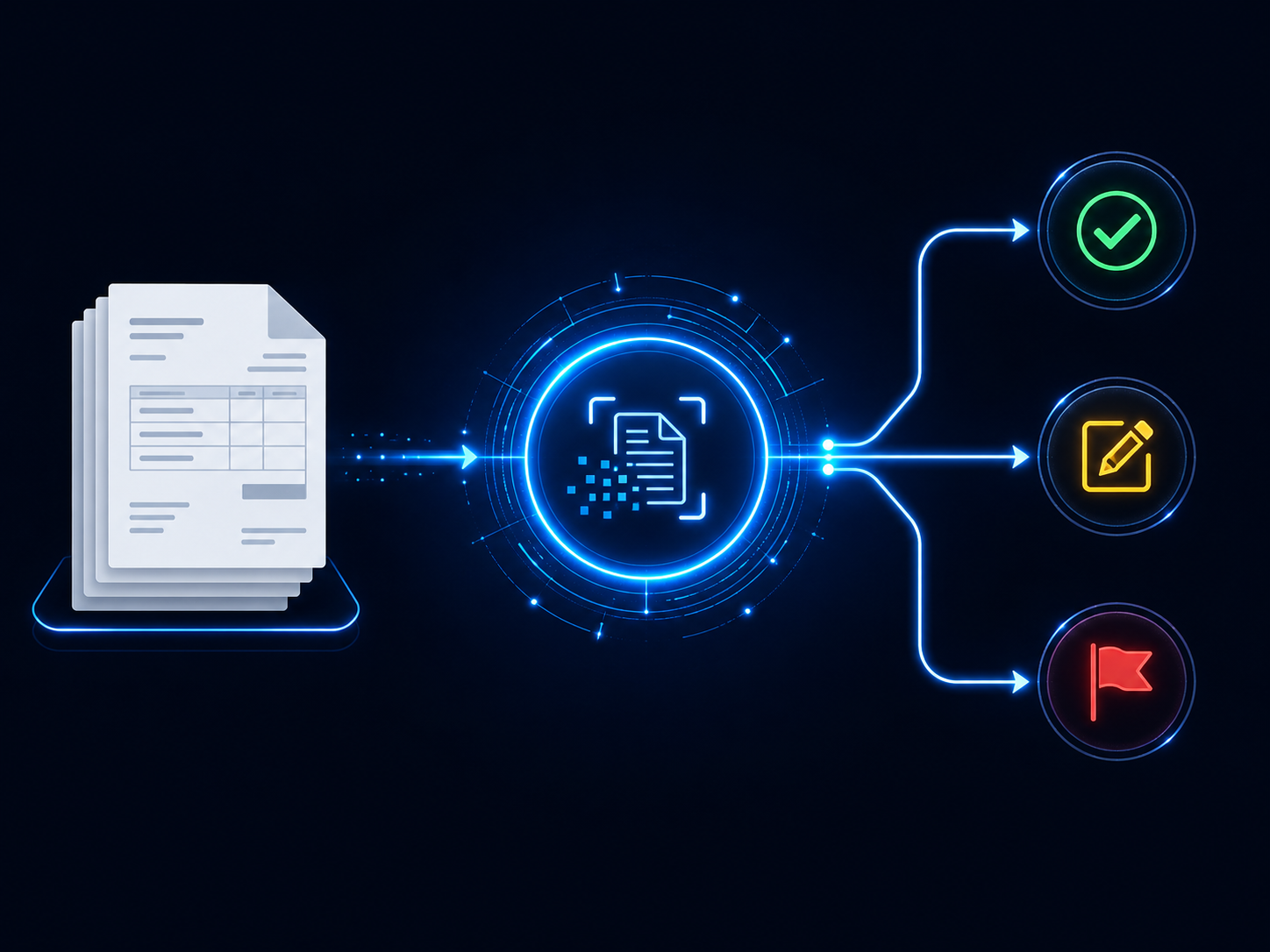
The Document Intelligence Agent accepts an invoice image, reads the text using optical character recognition, and calculates a confidence score for the OCR result. Optical character recognition, or OCR, is the process of turning text inside an image into machine-readable text.
If the confidence score is high enough, the agent sends the OCR text to an AI model with precise instructions to extract three invoice fields: invoice number, invoice date, and total amount. The model returns those fields as structured JSON, and the agent writes them to a clean output file.
If the confidence score is below the configured threshold, the agent does not attempt extraction. It routes the document to a human review queue with the timestamp, document name, OCR confidence score, a short raw text preview, and a human review flag.
That is the core lesson of this build. The agent does not try to repair weak OCR with another model call. It does not guess. It uses confidence as the routing signal.
Why I Built This
When talking about AI automation, someone will eventually ask: what happens when the AI gets it wrong? That question matters because most automation demos only show the happy path. They run the extraction, accept whatever comes back, and move on. The errors accumulate invisibly until they cause a real problem downstream.
What I wanted to build was an agent that treats uncertainty as a first-class architectural concern. Not an afterthought. Not a vague warning at the bottom of the file. A direct routing decision built into the core of the pipeline.
The agent does not just extract data. It checks whether the document was readable enough to justify extraction in the first place. That distinction is what separates a demonstration from something that starts to look useful in a business context.
This simplified version is intentionally smaller than the original idea. There is no PDF branch, no second confidence threshold, and no AI correction pass. That is the right tradeoff for this post because the architecture becomes easier to see: read the image, measure confidence, either extract or route to review.
The pattern is what matters. A business process should not treat every document the same way. Clean input can move forward. Low-quality input needs a human checkpoint.
The Architecture: How It Works
The pipeline runs in a straight line with one decision point.
An invoice image comes in. Tesseract reads it and produces two outputs: the raw text and a confidence score. The confidence score is a number that estimates how reliable the OCR reading was.
That score becomes the gate.
If the score is below the configured threshold, the agent writes a review record and stops. If the score meets or exceeds the threshold, the raw OCR text goes to the AI model for invoice field extraction.
The AI extraction step sends the text to a LiteLLM-compatible endpoint using a direct HTTP request. The prompt asks the model to return only valid JSON with three keys: invoice_number, invoice_date, and total_amount. If a value is missing, the model is instructed to return null instead of inventing a value.
The response is cleaned, parsed as JSON, and written to the output file.
Every environment-specific value lives outside the business logic. The model name, LiteLLM base URL, API key, confidence threshold, input path, output path, review queue path, and Tesseract command can all be configured without changing the routing logic.
The Core Components
Tesseract OCR is the text recognition engine. It runs against the invoice image and extracts both the visible text and word-level confidence scores. The agent averages those scores into a single document-level confidence number.
The Confidence Gate is the routing decision. There is one threshold. If OCR confidence is high enough, the document proceeds to extraction. If confidence is too low, it goes to human review.
The Extraction Step sends the OCR text to the configured model through a LiteLLM-compatible HTTP endpoint. The model is asked to return JSON with the three invoice fields used in this demo.
The Review Queue is an append-only JSON Lines file. JSON Lines means each line is its own JSON object. That makes the queue easy to append to and easy to process later. In this implementation, each review record includes the timestamp, document name, OCR confidence, a short raw text preview, and a flag showing that human review is required.
The Output File stores accepted extractions. It includes the OCR confidence score and the extracted fields returned by the model.
The Model-Agnostic Layer
Every AI call in this agent routes through a LiteLLM-compatible HTTP endpoint. The model name is pulled from the MODEL_NAME environment variable.
The code does not import the OpenAI SDK. It does not import LiteLLM as a Python package. It builds a JSON request directly and sends it to the configured /chat/completions endpoint.
That keeps the dependency list small. The Python dependencies are only pytesseract and Pillow. pytesseract lets Python talk to Tesseract. Pillow lets Python open and work with image files.
Switching supported model providers is handled through configuration. The extraction logic stays the same.
The Build: Step by Step
Step 1: Install Tesseract
Tesseract is a separate system-level install, not a Python package. The Python code calls Tesseract, but Tesseract itself must already be installed on the machine running the agent.
After installation, confirm the command works from your terminal:
tesseract --version
If the terminal cannot find Tesseract, set the TESSERACT_CMD value in your .env file to the correct command or executable path for your environment.
Step 2: Install Python Dependencies
pip install -r requirements.txt
The current requirements file is intentionally small:
pytesseract==0.3.13
Pillow==12.2.0
This build does not install the OpenAI SDK, python-dotenv, pdf conversion libraries, or the LiteLLM Python package.
Step 3: Configure the .env File
Copy .env.template to .env and fill in the values for your environment.
LITELLM_BASE_URL=http://localhost:4000
MODEL_NAME=YOUR_MODEL_NAME_HERE
LITELLM_API_KEY=YOUR_API_KEY_HERE
CONFIDENCE_THRESHOLD=50
INPUT_DOCUMENT_PATH=test_invoice_hq.png
OUTPUT_PATH=output/extracted_data.json
REVIEW_QUEUE_PATH=output/review_queue.jsonl
TESSERACT_CMD=tesseract
The important business value here is that the threshold is configurable. A stricter workflow can raise the threshold. A more tolerant internal demo can lower it. The routing logic does not need to change.
Step 4: Run the Agent
python agent.py
The agent loads configuration, checks for required environment variables, reads the invoice image, calculates OCR confidence, and routes the document. In testing, the high-quality invoice image produced 53.8% OCR confidence, cleared the 50% threshold, and wrote extracted JSON with invoice number INV-2026-001, invoice date 2026-05-09, and total amount 4500.00. The lower-quality invoice image produced 28.1% confidence and was routed to the review queue instead.
Step 5: Startup validation.
def require_env() -> None:
    needed = [
        "LITELLM_BASE_URL",
        "MODEL_NAME",
        "LITELLM_API_KEY",
        "CONFIDENCE_THRESHOLD",
        "INPUT_DOCUMENT_PATH",
        "OUTPUT_PATH",
        "REVIEW_QUEUE_PATH",
    ]
    missing = [key for key in needed if not os.getenv(key)]
    if missing:
        raise SystemExit(f"Missing environment variables: {', '.join(missing)}")
    print(f"[INFO] Active model: {os.getenv('MODEL_NAME')}")
What This Code Is Actually Doing
Before reading a document or calling a model, the agent checks that every required configuration value exists. Think of this as the pre-flight checklist.
If CONFIDENCE_THRESHOLD or INPUT_DOCUMENT_PATH is missing, the agent stops immediately and tells you which variable is missing. That is much better than failing later with an unclear error after the OCR or model call has already started.
Step 6: Reading the image and scoring OCR confidence.
def run_ocr(image_path: Path) -> tuple[str, float]:
    pytesseract.pytesseract.tesseract_cmd = os.getenv("TESSERACT_CMD", "tesseract")
    image = Image.open(image_path)
    ocr_data = pytesseract.image_to_data(image, output_type=pytesseract.Output.DICT)
    scores = [int(score) for score in ocr_data["conf"] if score != "-1"]
    confidence = sum(scores) / len(scores) if scores else 0.0
    return pytesseract.image_to_string(image), confidence
What This Code Is Actually Doing
This function opens the invoice image and asks Tesseract to read it.
The first OCR call gets word-level data, including a confidence score for each recognized word. A score of -1 means Tesseract did not produce a useful confidence value for that item, so the agent filters those out. It then averages the remaining scores into one confidence number.
The second OCR call gets the full text as a single string. The function returns both pieces together: the text for extraction and the confidence score for routing.
Step 7: The routing decision.
raw_text, confidence = run_ocr(image_path)
threshold = float(os.getenv("CONFIDENCE_THRESHOLD"))
print(f"[OCR] {image_path.name} confidence: {confidence:.1f}%")

if confidence < threshold:
    write_review(image_path, confidence, raw_text)
    return

extracted = extract_fields(raw_text)
write_accepted(extracted, confidence)
What This Code Is Actually Doing
This is the architectural heart of the agent.
The agent compares the OCR confidence score against the configured threshold. If the score is too low, the document goes to review and the extraction step never runs. If the score is high enough, the OCR text is sent to the model for field extraction.
That one decision protects the workflow from quietly accepting weak input.
Step 8: Calling the model through a LiteLLM-compatible endpoint.
def call_llm(prompt: str) -> str:
    payload = json.dumps(
        {
            "model": os.getenv("MODEL_NAME"),
            "messages": [{"role": "user", "content": prompt}],
            "temperature": 0,
        }
    ).encode("utf-8")

    request = Request(
        os.getenv("LITELLM_BASE_URL").rstrip("/") + "/chat/completions",
        data=payload,
        headers={
            "Authorization": "Bearer " + os.getenv("LITELLM_API_KEY"),
            "Content-Type": "application/json",
        },
    )
    with urlopen(request, timeout=60) as response:
        data = json.loads(response.read().decode("utf-8"))
    return data["choices"][0]["message"]["content"].strip()
What This Code Is Actually Doing
This function builds a model request manually. It creates a JSON payload containing the model name, the message, and the temperature setting.
Temperature controls how varied the model response is. In this build it is set to 0 because extraction should be consistent, not creative.
The function sends the request to the configured LiteLLM-compatible endpoint and returns the model’s text response. This is why the code does not need a separate OpenAI SDK import.
Step 9: Extracting invoice fields.
def extract_fields(text: str) -> dict:
    prompt = (
        "Extract invoice fields from the OCR text. "
        f"Return only JSON with these keys: {', '.join(FIELDS)}. "
        "Use null when a value is missing.\n\n"
        f"OCR text:\n{text}"
    )
    raw = call_llm(prompt)
    cleaned = re.sub(r"^```(?:json)?\s*|\s*```$", "", raw.strip(), flags=re.IGNORECASE)
    return json.loads(cleaned)
What This Code Is Actually Doing
This function turns OCR text into structured data.
The prompt tells the model exactly which fields to return. In this repo version, those fields are fixed in the code as invoice_number, invoice_date, and total_amount.
The regex line removes accidental JSON code fences if the model wraps its answer in them. A regex, or regular expression, is a pattern used to find and clean specific text. After cleaning, the function parses the response as JSON so Python can treat it as structured data.
Step 10: Writing accepted output.
def write_accepted(data: dict, confidence: float) -> None:
    output_path = project_path(os.getenv("OUTPUT_PATH"))
    output_path.parent.mkdir(parents=True, exist_ok=True)
    record = {"ocr_confidence": round(confidence, 1), "fields": data}
    output_path.write_text(json.dumps(record, indent=2), encoding="utf-8")
    print(f"[ACCEPTED] Wrote extracted fields to {output_path}")
What This Code Is Actually Doing
Accepted documents get written to the output file as formatted JSON. The file contains the OCR confidence score and the extracted fields.
The agent also creates the output folder automatically if it does not exist. That keeps the first run simple because the user does not need to manually create an output directory first.
Step 11: Routing low-confidence documents to review.
def write_review(image_path: Path, confidence: float, raw_text: str) -> None:
    review_path = project_path(os.getenv("REVIEW_QUEUE_PATH"))
    review_path.parent.mkdir(parents=True, exist_ok=True)
    record = {
        "timestamp": datetime.now(timezone.utc).isoformat(),
        "document": image_path.name,
        "ocr_confidence": round(confidence, 1),
        "raw_text_preview": raw_text[:300],
        "human_review_required": True,
    }
    with open(review_path, "a", encoding="utf-8") as file:
        file.write(json.dumps(record) + "\n")
    print(f"[REVIEW] Routed {image_path.name} to human review")
What This Code Is Actually Doing
Low-confidence documents get appended to the review queue instead of being extracted.
The record includes the document name, the UTC timestamp, the confidence score, a short preview of the OCR text, and a flag showing that human review is required. UTC is a standard time reference used so logs stay consistent across time zones.
The review queue is append-only. The agent adds a new line for each review item instead of rewriting the whole file. That makes the queue simple, durable, and easy to process later.
Errors I Hit
Tesseract not recognized after install. This usually means the terminal session cannot find the Tesseract executable. The fix is environment-specific: either make sure Tesseract is available on the system path or set TESSERACT_CMD in .env to the correct command for that machine.
Missing environment variables on first run. The agent is designed to stop early when required configuration values are missing. This is the startup check working correctly. Fill in the missing values in .env and run the agent again.
OCR confidence too low on synthetic test images. Simple generated images can still produce weak OCR confidence if the font is small, blurry, or poorly spaced. The fix is to use a clearer invoice image with larger text and stronger contrast when testing the accepted path.
Model response wrapped in code fences. Some models return JSON inside triple backticks even when asked not to. The extraction function strips those fences before parsing. This keeps the demo resilient across providers without adding a larger parsing framework.
What I Would Do Differently
The OCR confidence calculation averages across all recognized words in the image. A document with mostly clear text and one badly printed line can still be dragged down by that single weak area. A production version would likely calculate confidence by field region rather than by whole document average, so a blurry date does not automatically downgrade the entire invoice.
The extraction schema is fixed in the code. That is fine for a small teaching build because the fields are easy to see and reason about. A production version would likely move the schema into configuration or a separate schema file so the same pipeline could handle invoices, receipts, purchase orders, and contracts without code edits.
The review queue stores a short raw text preview. That is useful for triage, but in a sensitive environment I would decide carefully whether that preview belongs in the queue. Some organizations may want only the document name, confidence score, timestamp, and review flag.
The agent currently accepts image inputs. A production workflow may need PDF support, multi-page handling, rotation correction, image cleanup, and field-level confidence. Those are valuable additions, but they are not necessary to teach the core pattern.
The most important future upgrade is not more extraction. It is better routing. A serious document workflow needs to decide which documents can move automatically, which need partial review, and which should stop completely.
What This Means
Every business that receives documents from external parties faces this problem. Invoices from vendors. Contracts from clients. Applications from candidates. Receipts from employees. The manual process of reading each document and entering the relevant data into a system is one of the most common sources of administrative overhead in small and mid-size organizations.
This agent automates the first layer of that work while adding a transparent quality gate. When OCR confidence is high enough, it extracts structured data. When OCR confidence is too low, it routes to human review rather than pushing questionable data downstream.
That distinction matters. The goal is not to pretend automation is perfect. The goal is to design systems that know when the input quality is strong enough to proceed and when a human needs to inspect the document.
The architecture is also easy to adapt. A NosisTech deployment for invoice extraction and a deployment for receipt processing can use the same confidence-routing pattern. The fields, thresholds, and review workflow can evolve around the business case.
The larger lesson is simple: document automation becomes more useful when it includes judgment. Not human judgment inside every step, but architectural judgment about when the machine has enough signal to act and when it needs help.
A Note on Tesseract
Tesseract is the OCR engine that makes this agent possible. It reads text from images locally and gives the Python agent both the extracted text and confidence data.
That confidence data is what turns OCR from a blind extraction step into a routing signal. Without it, the agent would treat every document the same way. With it, the agent can separate readable documents from risky ones.
Most people think about OCR as a convenience feature. Take a picture, get text back. But in business automation, OCR confidence becomes an operational control. It tells the workflow when to continue and when to pause.
That matters across many use cases. Invoices, receipts, shipping labels, quality control forms, scanned applications, and legacy records all benefit from the same pattern: read the document, measure confidence, and route based on quality.
The engine is only one part of the system. The real leverage comes from wrapping it in a decision layer that protects the business from weak input while still moving clean documents forward.
Tools Used
- Tesseract OCR (Apache 2.0): github.com/tesseract-ocr/tesseract
- pytesseract (MIT): github.com/madmaze/pytesseract
- Pillow (HPND): github.com/python-pillow/Pillow
- pdf2image (MIT): github.com/Belval/pdf2image
- LiteLLM (MIT): github.com/BerriAI/litellm
- NosisTech Agent Engineering (MIT): github.com/nosistech/agent-engineering
(c) 2026 NosisTech LLC. Licensed under CC BY 4.0. Use freely, just credit us.