
Disclaimer: This article documents my personal exploration of AI governance frameworks and regulatory concepts. Nothing in this post constitutes legal advice, compliance certification, or a guarantee of regulatory conformance. AI governance requirements vary by jurisdiction, sector, and use case. Consult qualified legal and compliance professionals before making governance decisions. NosisTech LLC accepts no liability for outcomes arising from use of this content.
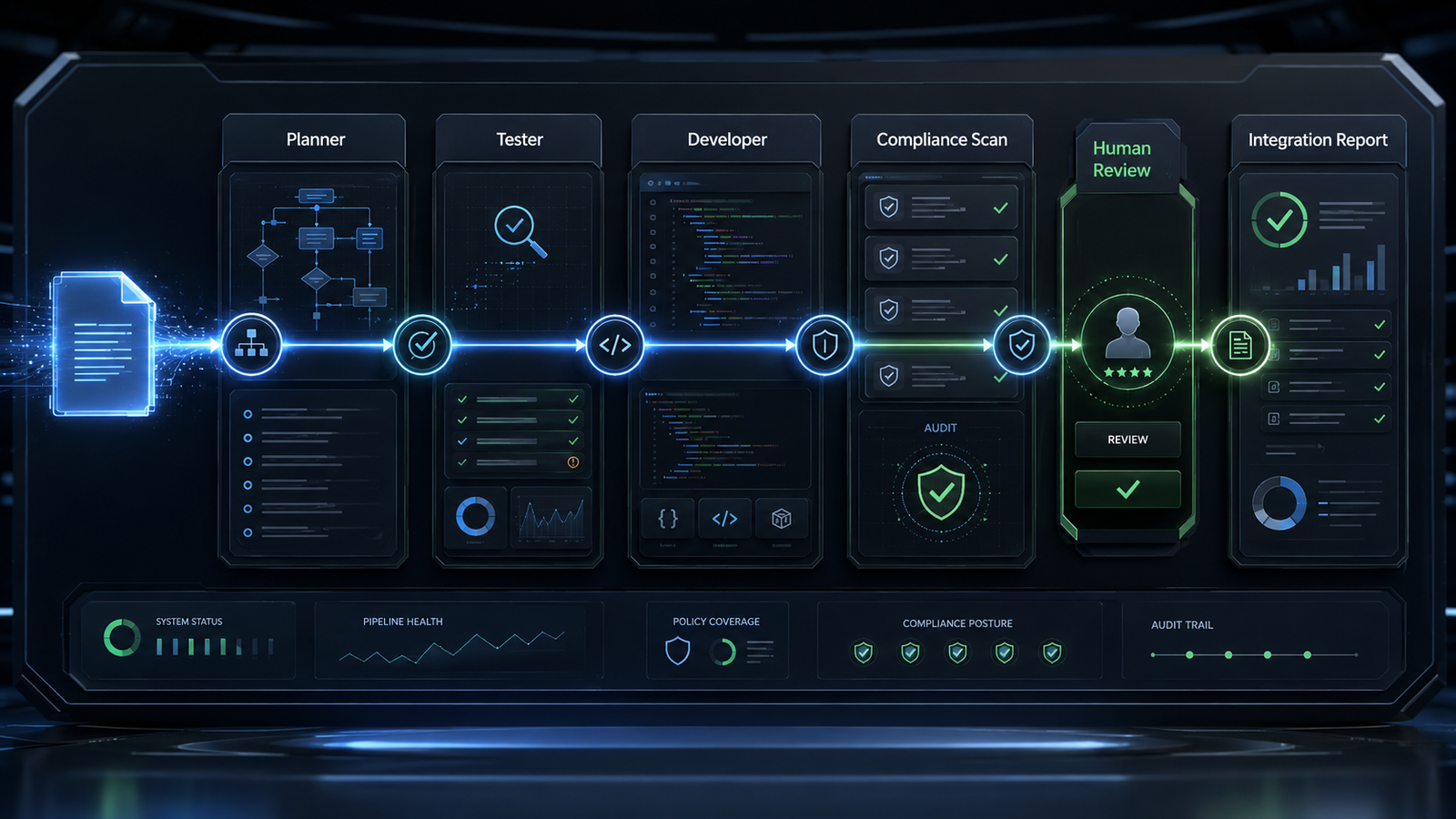
Most AI coding examples focus on generation. I wanted to focus on control. This build shows a small agent that can plan a software task, generate tests, write code, and then review that code before presenting the result. The lesson is not the factorial function. The lesson is how to put visible gates around AI-generated work.
What This Agent Does
This agent starts with a simple software request.
In my test, I asked it to create a Python function named factorial. A factorial is the result of multiplying a number by every whole number below it. For example, the factorial of 5 is 5 x 4 x 3 x 2 x 1, which equals 120.
The agent does not ask the model for code and accept the first answer blindly.
It moves through a fixed workflow:
- A planner creates a short engineering plan.
- A tester creates minimal test cases.
- A developer writes the smallest Python implementation.
- Python checks whether the generated code has valid syntax.
- A YAML policy file checks whether the code matches visible compliance rules.
- The workflow retries when the code fails syntax or blocking policy checks.
YAML is a simple text format often used for configuration files. In this build, rules.yaml is where the compliance policy lives.
The important idea is simple: the model writes the code, but the workflow reviews the code before I treat it as useful output.
Why I Built This
I built this because AI code generation is moving faster than the review systems around it.
A lot of AI coding examples still treat compliance as a sentence inside a prompt. That is too fragile for serious work. If a rule only exists inside the model instruction, it is harder to inspect, audit, and improve.
The standard I wanted to set here is clear: the model can generate, but the surrounding workflow decides whether the output is ready to discuss.
That distinction matters.
A builder who understands this is not just prompting a model. He is designing a controlled engineering system.
What Actually Happened
What I expected: I expected the agent to plan, generate tests, write implementation code, and pass the compliance scan with a small amount of retry logic.
What actually happened: The simplified architecture worked better than the larger version. Plain Python functions were easier to inspect than a graph framework for this teaching build.
What broke: Gemini returned implementation code plus pytest test code in one developer run. The code was valid Python, but it was not the output I wanted from the developer step.
What surprised me: The fix was not more architecture. The fix was a clearer developer prompt and one extra compliance rule that rejects generated test code when the agent asked for implementation only.
What I would change next: I would keep this version as the teaching build and move sandboxed code execution into a separate future build. Running generated code safely is its own architecture problem.
Why this matters: This build shows that simplicity is part of governance. A smaller agent is easier to explain, test, and trust.
The Architecture: How It Works
The user gives the agent one software requirement. The agent then moves that requirement through a fixed sequence.
The planner turns the request into an engineering plan. The tester turns the plan into test cases. The developer writes code against the request and tests. The syntax checker verifies that Python can read the generated code. The compliance scanner checks the generated code against rules in rules.yaml.
I replaced the graph orchestration pattern with ordinary Python functions and a plain retry loop.
A graph orchestrator is software that routes work between steps, like a factory conveyor belt. That can be useful for larger systems. For this build, the workflow was small enough that a normal loop was easier to read: generate code, check it, retry when needed, stop after three attempts.
The model-agnostic layer is LiteLLM. LiteLLM is the routing layer that lets the same agent call different model providers through one interface. In this build, I tested the agent through DeepSeek and Gemini routes configured behind the LiteLLM proxy. Changing providers required changing the model route in .env, not rewriting the Python code.
The Build: Step by Step
The first important piece is environment loading. The environment is where machine-specific settings live, such as the LiteLLM proxy address, model route, and API key.
REQUIRED_ENV = ("LITELLM_BASE_URL", "MODEL_NAME", "LITELLM_API_KEY")


def fail(message: str) -> None:
    raise SystemExit(message)


def load_environment() -> dict:
    load_dotenv()
    missing = [name for name in REQUIRED_ENV if not os.getenv(name)]
    if missing:
        fail("Missing required environment variables: " + ", ".join(missing))
    print(f"Active model: {os.environ['MODEL_NAME']}")
    return {key: os.environ[key] for key in REQUIRED_ENV}
What This Code Is Actually Doing
This code checks the setup before the agent makes any model call. It looks for three required settings: where the LiteLLM proxy is, which model route to use, and which key authorizes the request. It prints the active model route so I can confirm what is running, but it does not print the API key. That is the safety pattern here: show enough to debug the setup, while keeping secrets out of the terminal output.
The next piece sends a prompt to the configured model through the LiteLLM proxy.
def call_model(prompt: str, config: dict) -> str:
    payload = {"model": config["MODEL_NAME"], "messages": [{"role": "user", "content": prompt}]}
    url = config["LITELLM_BASE_URL"].rstrip("/") + "/v1/chat/completions"
    headers = {"Authorization": f"Bearer {config['LITELLM_API_KEY']}", "Content-Type": "application/json"}

    for attempt in range(MAX_ATTEMPTS):
        try:
            response = requests.post(url, headers=headers, json=payload, timeout=120)
            if response.status_code == 429:
                raise RuntimeError("rate limit")
            response.raise_for_status()
            return response.json()["choices"][0]["message"]["content"].strip()
        except Exception as error:
            if "rate limit" in str(error).lower() and attempt < MAX_ATTEMPTS - 1:
                wait = 2**attempt
                print(f"Rate limit reached. Retrying in {wait} seconds.")
                time.sleep(wait)
                continue
            fail("The AI model service is unavailable. Check the LiteLLM settings and try again.")
    fail("The AI model request could not be completed.")
What This Code Is Actually Doing
This function is the agent’s model gateway. A gateway is a controlled entry point. Instead of calling one provider directly inside the business logic, this function sends every request to the LiteLLM proxy. A proxy is a middle layer that receives the request and forwards it to the configured provider. If the model service is rate limited, the agent waits briefly and retries. If the service still fails, the agent exits with a plain-English message.
Before the agent asks the model to work, it validates the user’s request.
The developer prompt is intentionally narrow.
def ask(role: str, requirement: str, config: dict, plan: str = "", tests: str = "", feedback: str = "") -> str:
    prompts = {
        "planner": (
            "Create a short engineering plan for this request. Include inputs, outputs, "
            "edge cases, and acceptance criteria.\n\n"
            f"Request: {requirement}"
        ),
        "tester": (
            "Write minimal pytest-style tests for this request. Return only Python code.\n\n"
            f"Request: {requirement}\n\nPlan:\n{plan}"
        ),
        "developer": (
            "Write the smallest Python implementation that satisfies this request and tests. "
            "Return implementation code only. Do not include tests, pytest imports, markdown, "
            "examples, comments, or explanations. Do not use unnecessary imports or external packages.\n\n"
            f"Request:\n{requirement}\n\nTests:\n{tests}\n\nFeedback from prior attempt:\n{feedback}"
        ),
    }
    answer = call_model(prompts[role], config)
    return extract_code(answer) if role in {"tester", "developer"} else answer
What This Code Is Actually Doing
This is where the agent asks the model to act like the developer. The prompt gives the original request, the tests, and any feedback from a prior failed attempt. The most important part is the boundary: implementation code only. That boundary matters because one of the real failures in this build was the model returning test code during the developer step.
The compliance rules live outside the Python file.
rules:
  - id: SEC-01
    description: Generated code appears to contain a hardcoded secret.
    severity: critical
    action: block
    patterns:
      - '(api_key|password|secret|token)\s*=\s*["''][^"'']+["'']'

  - id: SEC-04
    description: Generated code appears to use unsafe shell execution.
    severity: critical
    action: block
    patterns:
      - 'os\.system\s*\('
      - 'subprocess\.(call|Popen|run)\s*\('
      - '\beval\s*\('
      - '\bexec\s*\('

  - id: CODE-01
    description: Generated code includes test code instead of implementation only.
    severity: medium
    action: rewrite
    patterns:
      - '\bimport\s+pytest\b'
      - '\bdef\s+test_'
      - '@pytest\.'
What This Code Is Actually Doing
This is a sample from rules.yaml. Each rule has an ID, a description, a severity, an action, and patterns. A pattern is a search rule that looks for a specific shape of text. Here, the agent looks for hardcoded secrets, unsafe shell execution, and test code appearing inside an implementation-only answer. Keeping these rules in YAML makes the policy visible without making someone read the whole Python file.
The scanner checks generated code against those rules.
def scan_compliance(code: str, rules: list[dict]) -> list[dict]:
    findings = []
    for line_number, line in enumerate(code.splitlines(), start=1):
        for rule in rules:
            for pattern in rule.get("patterns", []):
                try:
                    matched = re.search(pattern, line, re.IGNORECASE)
                except re.error:
                    fail("A compliance rule contains an invalid pattern.")
                if matched:
                    findings.append(
                        {
                            "rule_id": rule["id"],
                            "description": rule["description"],
                            "severity": rule["severity"],
                            "action": rule["action"],
                            "line": line_number,
                        }
                    )
    return findings
What This Code Is Actually Doing
This function acts like a reviewer with a checklist. It reads the generated code one line at a time, checks every line against every rule, and records any match. A regular expression is a search pattern that can find text shapes, not just exact words. If a rule pattern itself is broken, the agent exits cleanly instead of producing a confusing Python traceback.
The final workflow keeps the process bounded.
for attempt in range(1, MAX_ATTEMPTS + 1):
    print(f"Developer attempt {attempt}.")
    code = ask("developer", requirement, config, tests=tests, feedback=feedback)
    syntax_error = check_syntax(code)
    if syntax_error:
        feedback = f"Syntax failed: {syntax_error}"
        continue
    findings = scan_compliance(code, rules)
    if any(finding["action"] in {"rewrite", "block"} for finding in findings):
        rule_ids = ", ".join(finding["rule_id"] for finding in findings)
        feedback = f"Compliance failed. Avoid these rule patterns: {rule_ids}"
        continue
    break
What This Code Is Actually Doing
This is the control loop. A loop is code that repeats until a stopping condition is reached. In this agent, the developer gets up to three attempts. Each attempt creates code, checks whether Python can read it, and then scans it against the compliance rules. If syntax fails or a blocking rule appears, the loop writes feedback and tries again. If the code passes those checks, the loop stops.
Errors I Hit During This Build
The first error was a package installation permission issue. The message said permission was denied while installing into the user site packages directory. The cause was a Windows Python environment permission mismatch. I fixed it by testing the real PowerShell environment directly and verifying the required packages installed there.
The second error happened in an isolated virtual environment. The install failed with a Windows long path warning while unpacking a deeply nested LiteLLM file. The cause was the temporary environment path being too deep for that Windows configuration. I fixed the build by removing the local LiteLLM package dependency from the agent and calling the LiteLLM proxy through HTTP instead.
The third error was ModuleNotFoundError: No module named ‘litellm’ from my sandboxed shell. The cause was that my app shell could not see the same user-installed packages that Carlos’s PowerShell environment could see. I fixed that by relying on the environment that actually runs the agent and by simplifying the dependency list.
The fourth error was a model routing failure. The terminal showed LiteLLM provider guidance and then printed: “The AI model service is unavailable. Check the LiteLLM settings and try again.” The cause was a mismatch between the local client’s provider-prefix expectations and the model aliases exposed by the LiteLLM proxy. I fixed it by using the proxy’s chat completions endpoint directly and passing the proxy alias from .env.
The fifth error was a connection failure during proxy testing. PowerShell returned: “Unable to connect to the remote server.” The cause was that the secure tunnel to the proxy was not open. I fixed it by opening the tunnel in a separate terminal and keeping it open while the agent ran.
The final issue was a false assumption about localhost. On the laptop, localhost only reached the proxy after the secure tunnel existed. Once the tunnel was active, the model list endpoint returned the configured routes and both provider tests passed.
What I Would Do Differently
This build does not execute generated code. That was intentional. Running AI-generated code directly on the host machine is a different risk category. A production version would need an isolated execution sandbox, meaning a temporary locked-down environment where generated code can run with limited access to the rest of the machine.
I would also add vulnerability intelligence. The current compliance scan checks local static rules. Static means the rules are written ahead of time and do not update themselves during the run. This version does not check whether a dependency or code pattern became risky after a new vulnerability disclosure. That gap became Opportunity 042 in my opportunity log: real-time vulnerability triage for AI-generated code.
The other future improvement is version-control integration. This agent prints generated code and a report, but it does not create branches, open pull requests, or attach review evidence. That would be the next step toward turning this from a demo workflow into a real software delivery assistant.
What This Means
The business value is not that the agent writes a factorial function. The value is the pattern.
This build shows how an AI coding workflow can separate generation from review. The model can plan, test, and write, while the surrounding system applies visible gates. That matters for companies that want automation with a review process they can inspect.
For a founder, this pattern reduces the gap between idea and working prototype. For an operator, it creates a visible process around AI-generated work. For a governance team, it creates a place to put rules that can be reviewed without reading every prompt.
The larger lesson is that agentic AI becomes more useful when the workflow is constrained well. The goal is not to make the agent sound confident. The goal is to make the workflow inspectable.
Tools Used
- LiteLLM (MIT): github.com/BerriAI/litellm
- Requests (Apache-2.0): github.com/psf/requests
- PyYAML (MIT): github.com/yaml/pyyaml
- python-dotenv (BSD-3-Clause): github.com/theskumar/python-dotenv
- NosisTech Agent Engineering (MIT): github.com/nosistech/agent-engineering
(c) 2026 NosisTech LLC. Licensed under CC BY 4.0. Use freely, just credit us.